Sample 26030: How to Create a JSP ListBoxView
 |  |  |  |  |  |
Overview
The ListBoxView is a TransformationBeanTM that generates the appropriate HTML 4.0 and JavaScript for creating a ListBoxView. The ListBoxView is a menu that supports single or multiple selections. The ListBoxView can be used to render text, images, or both together.
Here are the steps for creating a simple ListBoxView:
- Create a ListModel.
- Create a ListBoxView.
- Set the model on the ListBoxView.
- Render the ListBoxView.
This sample shows how to create and render a JSP ListBoxView. The Full Code tab contains the full code for the default ListBoxView, and also for the customizations below.
The best practice for a JSP Web application is a JSP architecture that uses servlets and .jsp files in order to dynamically deliver content. JSP, Model 2 uses the Model-View-Controller paradigm. For simplicity, this sample does not use the JSP Model 2 approach.
Customizations
This example contains the following customizations:
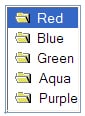
A default ListBoxView looks like the following:
Changing style classes
You might want to change the styles of the components in the ListBoxView to get a different look.To change the styles, you perform these tasks.
- Add the following styles in the <head> section of your JSP file.
- Edit your ListBoxView tag to set new style names. Add the following lines inside the tag.
    <style>
     .myStyle  {background: green; color: highlighttext;
               font-family: MS Shell Dlg; font-style: normal; font-size:10pt;}
    </style>
|
<sas:StyleMapKey key="listboxview_outer_div_xp" style="width:200px;"/>
        	<sas:StyleMapKey key="listboxview_row_highlight" classid="myStyle"/>
|
The resulting ListBoxView tag should look like this:
	<sas:ListBoxView id="lb1" model="model">
		<sas:StyleMapKey key="listboxview_outer_div_xp" style="width:200px;"/>
        	<sas:StyleMapKey key="listboxview_row_highlight" classid="myStyle"/>
    	</sas:ListBoxView>
|
Your new ListBoxView will look like the following when you select an item in the list:

Customizing the renderer
You might want to change the way the ListBoxView looks by customizing the renderer. This will enable you to do things such as add more elements to the ListBoxView.
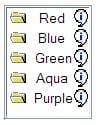
The following steps will show you how to create your own renderer for the ListBoxView that adds an information image to the right of the text and adds an action to show information when the user clicks on that image.
- Create a new file called myJSFile.js in your Web application directory.
- Add the following JavaScript code to the new file that you just created.
- Add the following <script> tag to the HTML header section of the JSP page to add the myJSFile.js file that was created.
- Set the render node function name for each node after you create each node in the model. For example, after you create node1 in the scriplet code, add the following line of code.
//Function used to render the nodes
function my_Node_nodeRender(_destinationObj)
{
	var node = this;
	//The table element that makes up the nodes
	var nodeTableObj = document.createElement("TABLE");
	nodeTableObj.border = 0;

   	nodeTableObj.height = "100%";
   	nodeTableObj.width = "100%";
        nodeTableObj.cellSpacing = 0;
     	nodeTableObj.cellPadding = 0;
        //Table body
 	var nodeTbodyObj = document.createElement("TBODY");
   	var nodeTrowObj = document.createElement("TR");
   	nodeTrowObj.id = "nodeTable";
        //First table column - holds the push button
        var nodeTcellObj1 = document.createElement("TD");
  	nodeTcellObj1.align = "left";
        //Second table column - holds the image
   	var nodeTcellObj2 = document.createElement("TD");
 	nodeTcellObj2.align = "left";
        //third table column - holds the new informaton image
	var nodeTcellObj3 = document.createElement("TD");
   	nodeTcellObj3.align = "right";

  	//Set the object this node is rendered in
 	destObj = document.getElementById(_destinationObj);
   	this.renderParent = destObj;

  	//create the image cell
   	if (this.image != "")
  	{
          	var nodeImg = document.createElement("IMG");   //Image element
      		nodeImg.id = "nodeIcon"+this.id;
      		nodeImg.name = "nodeIcon"+this.id;
    		nodeImg.src = this.getImageSrc(this.image);
     		nodeImg.className = this.getStyle("imageStyleClass");
      		nodeImg.alt = this.altText;
      		nodeImg.border = 0;
     		if(nodeImg.height == 0 || nodeImg.height == null)
        		this.height = 20;
        	if(nodeImg.height > this.height)
       			this.height = nodeImg.height;
      		this.width = this.width + nodeImg.width;
     		this.imgObj = nodeImg;
     		nodeTcellObj1.appendChild(nodeImg);
 	}
  	else
  	{
     		if (this.text != ""){
        		this.image = "blank.gif";
			var nodeImg = document.createElement("IMG");
			nodeImg.name = "nodeIcon"+this.id;
			nodeImg.src = this.getImageSrc(this.image);
			nodeImg.className = this.getStyle("imageStyleClass");
			nodeImg.alt = this.altText;
			nodeImg.border = 0;
			this.imgObj = nodeImg;
			nodeTcellObj1.appendChild(nodeImg);
		}
  	}

     	//create the text cell
   	if (this.text != "")
   	{
	     	var nodeSpanObj = document.createElement("SPAN");  //To hold the text
     		nodeSpanObj.id = "nodeSpan"+this.id;
     		nodeSpanObj.className = this.getStyle("textStyleClass");

      		var theText = document.createTextNode(this.text);
     		var numCapLtrs = this.text.match(sas_Node_alphabetPat);
     		if (numCapLtrs == null)
    		{
        		var numSmallLtrs = this.text.length;
         		this.width = this.width + (numSmallLtrs * 7);
      		}
     		else
     		{
              		var numSmallLtrs = this.text.length - numCapLtrs.length;
       			this.width = this.width + (numCapLtrs.length * 9) + (numSmallLtrs * 7);
          	}
          	if(this.height < 17)
       			this.height = 17;

		nodeSpanObj.title = this.text;
		nodeSpanObj.appendChild(theText);
		nodeSpanObj.onmousedown = function(event){return false;};
		nodeSpanObj.onclick = function(event){return false;};
		this.textObj = nodeSpanObj;
		nodeTcellObj2.noWrap = "true";
		nodeTcellObj2.appendChild(nodeSpanObj);
   	}

   	//create the new information cell
	var nodePushButton = document.createElement("IMG");   //pushButton element
	nodePushButton.src = "images/Info.gif";
	nodePushButton.height = 10;
	nodePushButton.id = "nodePushButton" + this.id;
	nodePushButton.className = this.getStyle("imageStyleClass");
	var infoText = this.text;
	nodePushButton.onclick = function (event){showInformation(infoText);};
	nodeTcellObj3.appendChild(nodePushButton);

   	//append all cells to the row and the row to the table
  	nodeTrowObj.appendChild(nodeTcellObj1);
   	nodeTrowObj.appendChild(nodeTcellObj2);
   	nodeTrowObj.appendChild(nodeTcellObj3);
   	nodeTbodyObj.appendChild(nodeTrowObj);
 	nodeTableObj.appendChild(nodeTbodyObj);
   	return nodeTableObj;
}


//Function to show information
function showInformation(infoText)
{
	alert("The color " + infoText);
}
|
<script language="JavaScript" src="myJSFile.js"></script>
|
node1.setRenderNodeFunctionName("my_Node_nodeRender");
|
You will get a ListBoxView that looks like this:
When you click on the information image next to the "Red" item in the ListBoxView, you will get a window that looks like this:

These sample files and code examples are provided by SAS Institute Inc. "as is" without warranty of any kind, either express or implied, including but not limited to the implied warranties of merchantability and fitness for a particular purpose. Recipients acknowledge and agree that SAS Institute shall not be liable for any damages whatsoever arising out of their use of this material. In addition, SAS Institute will provide no support for the materials contained herein.
Instructions
- Build a new Web application project in SAS AppDev Studio. No Web application template is necessary.
- Create new JSP pages using the code below.
- For the customization of the renderer, the JSP code and scriptlet code must both be added to the Web application.
- Execute the JSP page on the test Tomcat server.
Tip: For help with building a Web application project and testing a Web application, see SAS Note 32218.
Code for default ListBoxView
<%@ taglib uri="http://www.sas.com/taglib/sas" prefix="sas" %>
<%@ page pageEncoding="UTF-8"%>
<%@page import="javax.swing.DefaultListModel"%>
<%@page import="com.sas.servlet.tbeans.models.JavaScriptNode"%>
<html>
<head>
    <link href="styles/sasComponents.css" rel="STYLESHEET" type="text/css">

</head>
<body>

<%
	//create a DefaultListModel
	DefaultListModel model = new DefaultListModel();

	//Create the Nodes
	JavaScriptNode node1 =
		new JavaScriptNode();
	node1.setText("Red");
	node1.setValue("r");
	node1.setImage("folderOpen.gif");

	JavaScriptNode node2 =
		new JavaScriptNode();
	node2.setText("Blue");
	node2.setValue("b");
	node2.setImage("folderOpen.gif");

	JavaScriptNode node3 =
		new JavaScriptNode();
	node3.setText("Green");
	node3.setValue("g");
	node3.setImage("folderOpen.gif");

	JavaScriptNode node4 =
		new JavaScriptNode();
	node4.setText("Aqua");
	node4.setValue("a");
	node4.setImage("folderOpen.gif");

	JavaScriptNode node5 =
		new JavaScriptNode();
	node5.setText("Purple");
	node5.setValue("p");
	node5.setImage("folderOpen.gif");

	model.addElement(node1);
	model.addElement(node2);
	model.addElement(node3);
	model.addElement(node4);
	model.addElement(node5);
	//Set it on the session
	if (session != null){
		session.setAttribute("model", model);
	}
%>

	<sas:ListBoxView  id="lb1" model="model">
    </sas:ListBoxView>

</body>
</html>
|
Code for customization - Customizing the Styles by changing style classes
<%@ taglib uri="http://www.sas.com/taglib/sas" prefix="sas" %>
<%@ page pageEncoding="UTF-8"%>
<%@page import="javax.swing.DefaultListModel"%>
<%@page import="com.sas.servlet.tbeans.models.JavaScriptNode"%>
<html>
<head>
    <link href="styles/sasComponents.css" rel="STYLESHEET" type="text/css">
	<style>
		.myStyle  {
			background: green;
			color: highlighttext;
	        font-family: MS Shell Dlg;
	        font-style: normal;
	        font-size:10pt;}
	</style>

</head>
<body>

<%
	//create a DefaultListModel
	DefaultListModel model = new DefaultListModel();

	//Create the Nodes
	JavaScriptNode node1 =
		new JavaScriptNode();
	node1.setText("Red");
	node1.setValue("r");
	node1.setImage("folderOpen.gif");

	JavaScriptNode node2 =
		new JavaScriptNode();
	node2.setText("Blue");
	node2.setValue("b");
	node2.setImage("folderOpen.gif");

	JavaScriptNode node3 =
		new JavaScriptNode();
	node3.setText("Green");
	node3.setValue("g");
	node3.setImage("folderOpen.gif");

	JavaScriptNode node4 =
		new JavaScriptNode();
	node4.setText("Aqua");
	node4.setValue("a");
	node4.setImage("folderOpen.gif");

	JavaScriptNode node5 =
		new JavaScriptNode();
	node5.setText("Purple");
	node5.setValue("p");
	node5.setImage("folderOpen.gif");

	model.addElement(node1);
	model.addElement(node2);
	model.addElement(node3);
	model.addElement(node4);
	model.addElement(node5);
	//Set it on the session
	if (session != null){
		session.setAttribute("model", model);
	}
%>

	<sas:ListBoxView id="lb1" model="model">
		<sas:StyleMapKey key="listboxview_outer_div_xp" style="width:200px;"/>
        	<sas:StyleMapKey key="listboxview_row_highlight" classid="myStyle"/>
    	</sas:ListBoxView>

</body>
</html>
|
JSP Code for customization - Customizing the renderer
<%@taglib uri="http://www.sas.com/taglib/sas" prefix="sas" %>
<%@page pageEncoding="UTF-8"%>
<%@page import="javax.swing.DefaultListModel"%>
<%@page import="com.sas.servlet.tbeans.models.JavaScriptNode"%>
<html>
<head>
    <link href="styles/sasComponents.css" rel="STYLESHEET" type="text/css">
    <script language="JavaScript" src="myJSFile.js"></script>
</head>
<body>

<%
	//create a DefaultListModel
	DefaultListModel model = new DefaultListModel();

	//Create the Nodes
	JavaScriptNode node1 =
		new JavaScriptNode();
	node1.setText("Red");
	node1.setValue("r");
	node1.setImage("folderOpen.gif");
	node1.setRenderNodeFunctionName("my_Node_nodeRender");

	JavaScriptNode node2 =
		new JavaScriptNode();
	node2.setText("Blue");
	node2.setValue("b");
	node2.setImage("folderOpen.gif");
	node2.setRenderNodeFunctionName("my_Node_nodeRender");

	JavaScriptNode node3 =
		new JavaScriptNode();
	node3.setText("Green");
	node3.setValue("g");
	node3.setImage("folderOpen.gif");
	node3.setRenderNodeFunctionName("my_Node_nodeRender");

	JavaScriptNode node4 =
		new JavaScriptNode();
	node4.setText("Aqua");
	node4.setValue("a");
	node4.setImage("folderOpen.gif");
	node4.setRenderNodeFunctionName("my_Node_nodeRender");

	JavaScriptNode node5 =
		new JavaScriptNode();
	node5.setText("Purple");
	node5.setValue("p");
	node5.setImage("folderOpen.gif");
	node5.setRenderNodeFunctionName("my_Node_nodeRender");

	model.addElement(node1);
	model.addElement(node2);
	model.addElement(node3);
	model.addElement(node4);
	model.addElement(node5);
	//Set it on the session
	if (session != null){
		session.setAttribute("model", model);
	}
%>

	<sas:ListBoxView id="lb1" model="model"/>

</body>
</html>
|
JavaScript Code for customization - Customizing the Renderer
This code must be created in a file called myJSFile.js, that resides in the same directory as the jsp code above.
//Function used to render the nodes
function my_Node_nodeRender(_destinationObj)
{
	var node = this;
	//The table element that makes up the nodes
	var nodeTableObj = document.createElement("TABLE");
	nodeTableObj.border = 0;

   	nodeTableObj.height = "100%";
   	nodeTableObj.width = "100%";
        nodeTableObj.cellSpacing = 0;
     	nodeTableObj.cellPadding = 0;
        //Table body
 	var nodeTbodyObj = document.createElement("TBODY");
   	var nodeTrowObj = document.createElement("TR");
   	nodeTrowObj.id = "nodeTable";
        //First table column - holds the push button
        var nodeTcellObj1 = document.createElement("TD");
  	nodeTcellObj1.align = "left";
        //Second table column - holds the image
   	var nodeTcellObj2 = document.createElement("TD");
 	nodeTcellObj2.align = "left";
        //third table column - holds the new informaton image
	var nodeTcellObj3 = document.createElement("TD");
   	nodeTcellObj3.align = "right";

  	//Set the object this node is rendered in
 	destObj = document.getElementById(_destinationObj);
   	this.renderParent = destObj;

  	//create the image cell
   	if (this.image != "")
  	{
          	var nodeImg = document.createElement("IMG");   //Image element
      		nodeImg.id = "nodeIcon"+this.id;
      		nodeImg.name = "nodeIcon"+this.id;
    		nodeImg.src = this.getImageSrc(this.image);
     		nodeImg.className = this.getStyle("imageStyleClass");
      		nodeImg.alt = this.altText;
      		nodeImg.border = 0;
     		if(nodeImg.height == 0 || nodeImg.height == null)
        		this.height = 20;
        	if(nodeImg.height > this.height)
       			this.height = nodeImg.height;
      		this.width = this.width + nodeImg.width;
     		this.imgObj = nodeImg;
     		nodeTcellObj1.appendChild(nodeImg);
 	}
  	else
  	{
     		if (this.text != ""){
        		this.image = "blank.gif";
			var nodeImg = document.createElement("IMG");
			nodeImg.name = "nodeIcon"+this.id;
			nodeImg.src = this.getImageSrc(this.image);
			nodeImg.className = this.getStyle("imageStyleClass");
			nodeImg.alt = this.altText;
			nodeImg.border = 0;
			this.imgObj = nodeImg;
			nodeTcellObj1.appendChild(nodeImg);
		}
  	}

     	//create the text cell
   	if (this.text != "")
   	{
	     	var nodeSpanObj = document.createElement("SPAN");  //To hold the text
     		nodeSpanObj.id = "nodeSpan"+this.id;
     		nodeSpanObj.className = this.getStyle("textStyleClass");

      		var theText = document.createTextNode(this.text);
     		var numCapLtrs = this.text.match(sas_Node_alphabetPat);
     		if (numCapLtrs == null)
    		{
        		var numSmallLtrs = this.text.length;
         		this.width = this.width + (numSmallLtrs * 7);
      		}
     		else
     		{
              		var numSmallLtrs = this.text.length - numCapLtrs.length;
       			this.width = this.width + (numCapLtrs.length * 9) + (numSmallLtrs * 7);
          	}
          	if(this.height < 17)
       			this.height = 17;

		nodeSpanObj.title = this.text;
		nodeSpanObj.appendChild(theText);
		nodeSpanObj.onmousedown = function(event){return false;};
		nodeSpanObj.onclick = function(event){return false;};
		this.textObj = nodeSpanObj;
		nodeTcellObj2.noWrap = "true";
		nodeTcellObj2.appendChild(nodeSpanObj);
   	}

   	//create the new information cell
	var nodePushButton = document.createElement("IMG");   //pushButton element
	nodePushButton.src = "images/Info.gif";
	nodePushButton.height = 10;
	nodePushButton.id = "nodePushButton" + this.id;
	nodePushButton.className = this.getStyle("imageStyleClass");
	var infoText = this.text;
	nodePushButton.onclick = function (event){showInformation(infoText);};
	nodeTcellObj3.appendChild(nodePushButton);

   	//append all cells to the row and the row to the table
  	nodeTrowObj.appendChild(nodeTcellObj1);
   	nodeTrowObj.appendChild(nodeTcellObj2);
   	nodeTrowObj.appendChild(nodeTcellObj3);
   	nodeTbodyObj.appendChild(nodeTrowObj);
 	nodeTableObj.appendChild(nodeTbodyObj);
   	return nodeTableObj;
}


//Function to show information
function showInformation(infoText)
{
	alert("The color " + infoText);
}
|
These sample files and code examples are provided by SAS Institute Inc. "as is" without warranty of any kind, either express or implied, including but not limited to the implied warranties of merchantability and fitness for a particular purpose. Recipients acknowledge and agree that SAS Institute shall not be liable for any damages whatsoever arising out of their use of this material. In addition, SAS Institute will provide no support for the materials contained herein.
Default ListBoxView
Customizing the Styles by changing style classes
Customizing the renderer
| Type: | Sample |
| Date Modified: | 2008-08-25 15:27:09 |
| Date Created: | 2006-02-14 10:46:50 |
Operating System and Release Information
| Product Family | Product | Host | Product Release | SAS Release | ||
| Starting | Ending | Starting | Ending | |||
| SAS System | SAS AppDev Studio | Microsoft Windows Server 2003 Enterprise Edition | 3.2 | 9.1 TS1M3 SP4 | ||
| Microsoft Windows Server 2003 Datacenter Edition | 3.2 | 9.1 TS1M3 SP4 | ||||
| Microsoft Windows NT Workstation | 3.2 | 9.1 TS1M3 SP4 | ||||
| Microsoft Windows 2000 Professional | 3.2 | 9.1 TS1M3 SP4 | ||||
| Microsoft Windows 2000 Server | 3.2 | 9.1 TS1M3 SP4 | ||||
| Microsoft Windows 2000 Datacenter Server | 3.2 | 9.1 TS1M3 SP4 | ||||
| Microsoft Windows 2000 Advanced Server | 3.2 | 9.1 TS1M3 SP4 | ||||
| Microsoft® Windows® for x64 | 3.2 | 9.1 TS1M3 SP4 | ||||
| Microsoft Windows Server 2003 Standard Edition | 3.2 | 9.1 TS1M3 SP4 | ||||
| Microsoft Windows XP Professional | 3.2 | 9.1 TS1M3 SP4 | ||||
| Windows Vista | 3.2 | 9.1 TS1M3 SP4 | ||||