Account Signature
An account signature is the cross-section of the dimension members from each dimension in a module. A dimension member should not be a Null value in the account signature. If the dimension member is not specified, then No<Dimension> is replaced with the system dimension member, None. Hence, None and Null values are not the same when comparing dimension members in the account signature.
If an account is searched by a dimension that is not part of its signature, then the result value returns as Null. A Null value indicates that a particular dimension is not associated with an account. That is the reason why Null is not present in the account signature, whereas None is associated with a valid dimension in the account signature. Hence, Null is never treated the same as None.
Example 1
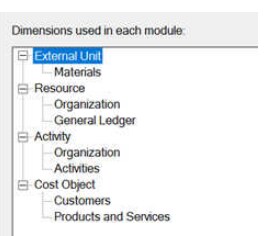
- Accounts in the Resource module have signatures of only the dimensions Organization and General Ledger. The other dimensions are invalid for the accounts in the Resource module.
- Accounts in the Activity module have signatures of only the dimensions Organization and Activities. The other dimensions are invalid for the accounts in the Activity module.
- Accounts in the Cost Object module have signatures of only the dimensions Customers and Products and Services. The other dimensions are invalid for the accounts in the Cost Object module.
Sample Accounts Created in the Resource Module
- org1 x gl1
-
In this account signature, one dimension member is specified from each dimension in the Resource module. The other dimensions are not associated with this account for None or Null placeholders.
- None<Organization> x gl1
-
In this account signature, no dimension member is specified for the dimension Organization, which is associated with this account. Hence, it is replaced with None internally to complete the signature.
Rule-Based Driver Assignments When Dimension Member Is None or Null
Case 1: Driver Rule = "Cust".IsNone()
- This rule criterion creates assignments with only the accounts in the module where the dimension Customers is present in the signature.
- This rule criterion does not create assignments with the accounts in the module where the dimension Customers is not present in the signature.
- The dimension Customers is associated only with the Cost Object module. Hence, only accounts in the Cost Object module are valid for the rule-based driver assignments.
- Assignments are created with the accounts in the Cost Object module that have the dimension member value None<Customer> in the signature. In that case, the dimension member value is None and not Null.
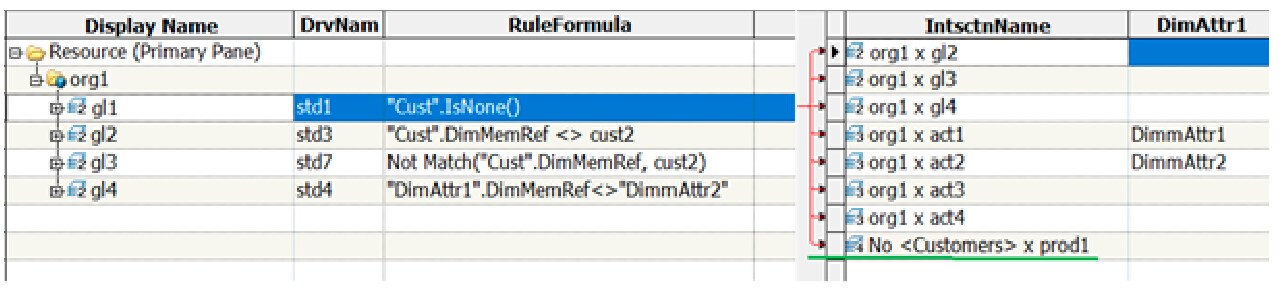
- Account None<Customers> x prod1 is eligible to create only a rule-based driver assignment as the driver rule, “Cust”.IsNone() is evaluated as True. Hence, only one assignment is supposed to be created, which is No <Customers> x prod1 that is mentioned in the column IntsctnName.
- For the rest of the accounts, the dimension Customers is not associated. Hence, the driver rule, “Cust”.IsNone() is evaluated as False. Therefore, the assignments are not created for those accounts.
- The IsNull condition should specify
explicitly to generate the same number of assignments as in SAS Cost and Profitability
Management 8.4. The previously mentioned driver rule must be edited as
shown in the following example:
Driver Rule = "Cust".IsNone() or IsNull("Cust".DimMemRef)
Case 2: Driver Rule = "Cust".DimMemRef <> cust2
- This rule criterion creates assignments with the accounts in the module where the dimension Customers is present in the signature.
- This rule criterion does not create assignments with the accounts in the module where dimension Customers is not present in the signature.
- The dimension Customers is associated only with the Cost Object module. Hence, only accounts in the Cost Object module are valid for the rule-based driver assignments.
- Assignments are created with the accounts in the Cost Object module that have the dimension member value None<Customer> and <> cust2 in the signature.
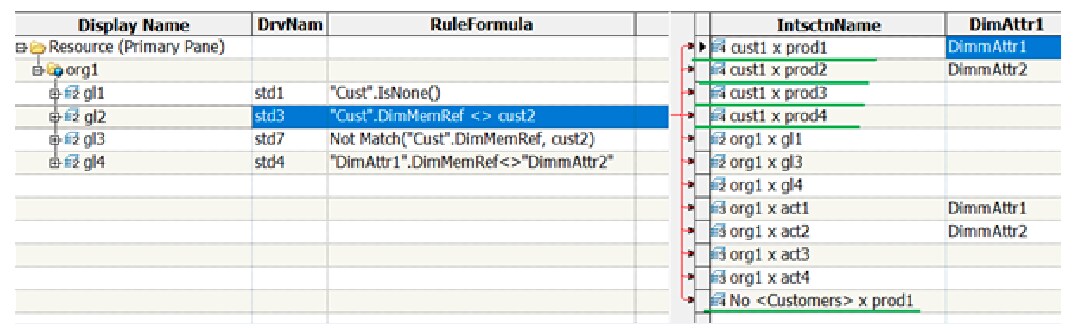
- The accounts cust1 x prod1, cust1 x prod2, cust1 x prod3, cust1 x prod4, and None<Customers> x prod1 are eligible to create only the rule-based driver assignments as the driver rule "Cust".DimMemRef <> cust2 is evaluated as True. Hence, only five assignments are supposed to be created. They are cust1 x prod1, cust1 x prod2, cust1 x prod3, cust1 x prod4, and No <Customers> x prod1 as mentioned in the column IntsctnName.
- For the rest of the accounts, the dimension Customers is not associated. Hence, the driver rule, "Cust".DimMemRef <> cust2 is evaluated as False. Therefore, the assignments are not created for those accounts.
- The IsNull condition should specify
explicitly to generate the same number of assignments as in SAS Cost and Profitability
Management 8.4. The above-mentioned driver rule must be edited as
below:
Driver Rule = "Cust".DimMemRef <> cust2 or IsNull("Cust".DimMemRef)
Case 3: Driver Rule = Not Match("Cust".DimMemRef, cust2)
For this driver rule, the same number of assignments are created with the destination accounts in the Cost Object module, as explained in Case 2.
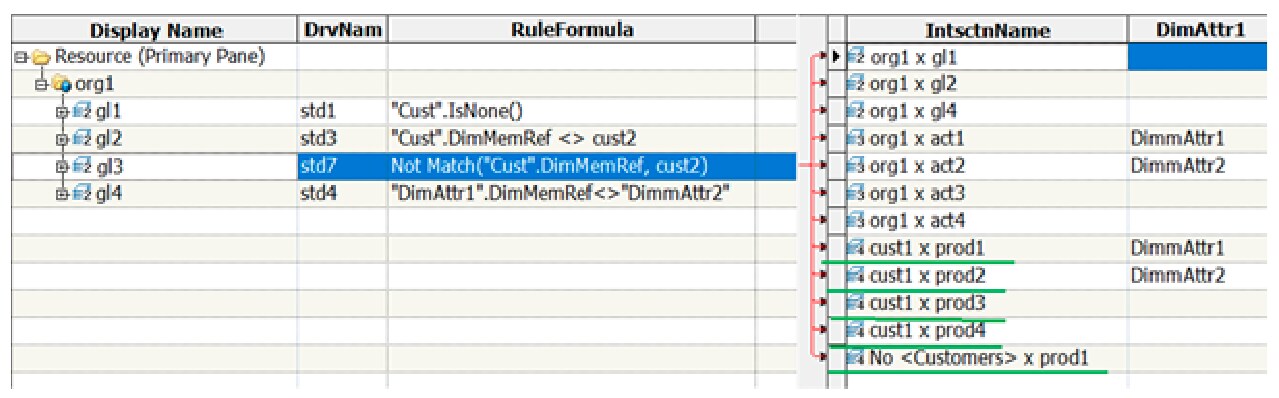
The IsNull condition should specify explicitly to generate the same number of assignments as in SAS Cost and Profitability Management 8.4. The previously mentioned driver rule must be edited as shown in the following example:
Driver Rule = Not Match("Cust".DimMemRef, cust2) or IsNull("Cust".DimMemRef)
Case 4: Driver Rule = "DimAttr1".DimMemRef<>"DimmAttr2"
- This rule criterion creates assignments with the accounts where the attribute dimension DimAttr1 is associated.
- This rule criterion does not create assignments with the accounts where the attribute dimension DimAttr1 is not associated.
- Assignments are created with the accounts that have the attribute dimension member value as <> DimmAttr2.
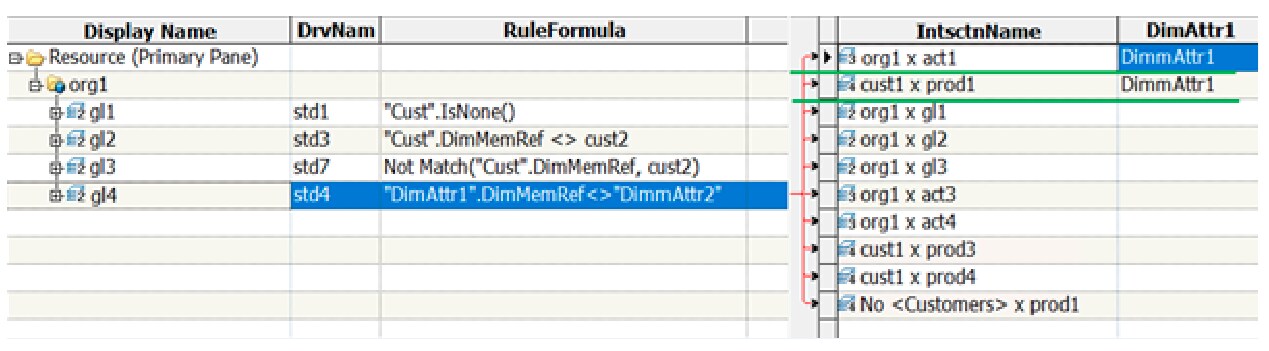
- The accounts org1 x act1 and cust1 x prod1 are eligible to create only the rule-based driver assignment as the driver rule "DimAttr1".DimMemRef<>"DimmAttr2" is evaluated as True. Hence, only two assignments are supposed to be created, org1 x act1 and cust1 x prod1 as mentioned in the column IntsctnName.
- For the rest of the accounts, the attribute dimension, DimAttr1 is not associated. Hence, the driver rule, "DimAttr1".DimMemRef<>"DimmAttr2" is evaluated as False. Therefore, the assignments are not created with those accounts.
- The IsNull condition should specify
explicitly to generate the same number of assignments as in SAS Cost and Profitability
Management 8.4. The driver rule mentioned previously must be edited as
follows:
Driver Rule = "DimAttr1".DimMemRef<>"DimmAttr2" or IsNull("DimAttr1".DimMemRef)