
| Introduction |
Why Program in Stat Studio?
Although you can use Stat Studio as a point-and-click tool for exploratory data analysis, there are advantages to writing programs in Stat Studio. Writing programs enables you to do the following:
- create your own customized statistical graphics
- add legends, curves, maps, or other custom features to statistical graphics
- develop interactive programs that use dialog boxes
- extend the built-in analyses by calling SAS procedures
- create custom analyses
- repeat an analysis on different data
- extend the results of SAS procedures by using IML
- share analyses with colleagues who also use Stat Studio
- call functions from libraries written in C/C++, FORTRAN, or Java
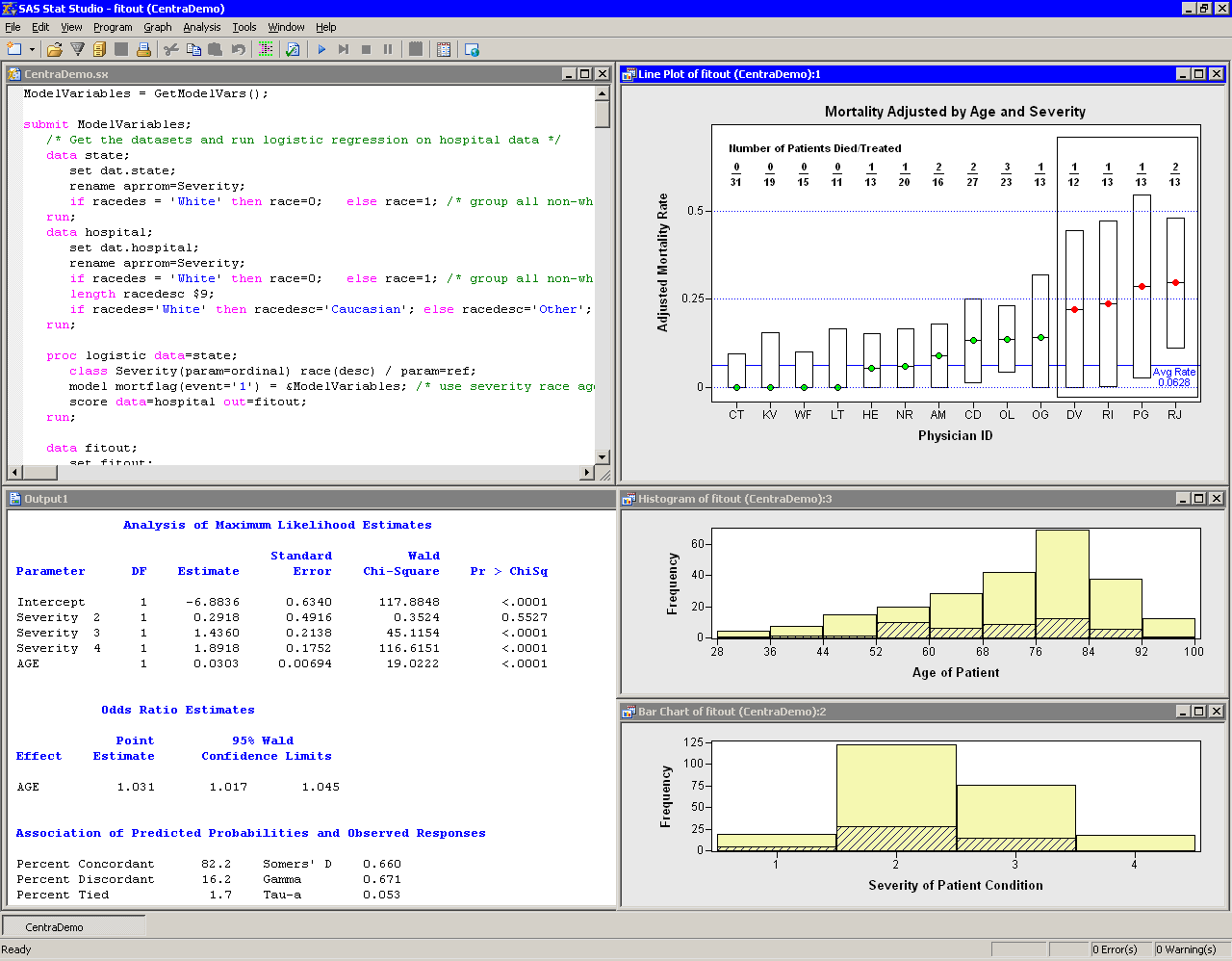
Figure 1.2 shows the results of a program that evaluates the mortality of patients admitted to a certain hospital with congestive heart failure. The program uses a statewide database to build a logistic model predicting mortality as a function of a patient's age and the severity of her condition. The program uses IML to compute an adjusted mortality rate (with confidence limits) for cardiac physicians employed by the hospital. The adjusted rates are based on the observed number of deaths, the expected number of deaths (as predicted by the statewide model), and the mean number of deaths for this hospital.
The program implements many of the features listed previously. It
creates a custom graphic with explanatory text. It calls DATA steps
and the LOGISTIC procedure. It extends the results of the LOGISTIC
procedure by using IML to compute adjusted mortality rates. It
presents Stat Studio's dynamically linked graphics to enable you to
explore why some physicians have high rates of patient mortality, to decide
whether those rates are unacceptably high, and to evaluate the overall
performance of this hospital's staff compared to staff at other
hospitals in the state. Although not shown in Figure 1.2,
the program even uses a dialog box to enable you to choose the
explanatory effects used to create the logistic model.
|
Figure 1.2: Results of an IMLPlus Program
Copyright © 2008 by SAS Institute Inc., Cary, NC, USA. All rights reserved.