Querying and Reading Member Tables in a Dynamic Cluster
You can read the member
tables in dynamic clusters by using the MEMNUM= table option. Use
the MEMNUM= option to perform query or Read operations on a single
member table that belongs to a dynamic cluster. When you use the MEMNUM=
option, SPD Server opens only the specified member table, instead
of opening all of the member tables that belong to the dynamic cluster.
You can determine the member number of a table in the dynamic cluster
by issuing a CLUSTER LIST statement or PROC CONTENTS on the dynamic
cluster. The SPD Server CLUSTER LIST statement or PROC CONTENTS output
lists the member tables of the dynamic cluster in numbered order.
The general form for
the PROC SPDO CLUSTER LIST command is as follows:
Syntax
CLUSTER LIST cluster-tablename<OUT=output-SAS-data-set> </VERBOSE>;
Arguments
cluster-tablename
the name of the dynamic
cluster table that you want to query for a member list.
OUT=output-SAS-data-set
the output SAS data
set that contains the results of the CLUSTER LIST command. The CLUSTER
LIST command creates output in columns for Cluster Name and Member
Name.
If the /VERBOSE option
is specified on the CLUSTER LIST command, columns for Variable Name,
Minimum Value and Maximum Value are added to the output data set.
/VERBOSE
The optional /VERBOSE
command-line switch turns on verbose CLUSTER LIST output that contains
additional member table information. The /VERBOSE option outputs CLUSTER
LIST columns for Cluster Name, Member Name, Variable Name, Minimum
Value, and Maximum Value.
Example
The following example
generates a list of the member tables in the dynamic cluster table
sales_hist,
and writes the output to a SAS data set named FOO.OUTFILE.
CLUSTER
                  LIST sales_hist OUT=FOO.OUTFILE ;
After you have determined
the constituent table components of a dynamic cluster, you can then
perform SPD Server cluster table operations such as CLUSTER CREATE,
CLUSTER MODIFY, and CLUSTER UNDO.
The general form for
the PROC SPDO CLUSTER UNDO command is as follows:
Syntax
CLUSTER UNDO cluster-tablename;
Arguments
cluster-tablename
the name of the cluster
table to undo.
Example
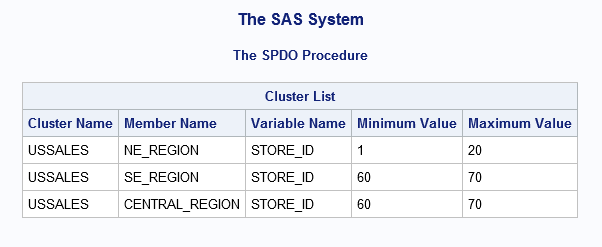
The following example
uses PROC SPDO to create a dynamic cluster that has MINMAXVARLIST
information about the numeric column STORE_ID in each member table.
Then, a CLUSTER LIST statement is issued with the VERBOSE option.
The CLUSTER LIST output displays the dynamic cluster name, the names
of each member table in the dynamic cluster, and the MINMAXVARLIST
information for each member table.
PROC SPDO library=&libdom;

CLUSTER CREATE ussales
  mem=ne_region
  mem=se_region
  mem=central_region

CLUSTER LIST ussales /VERBOSE;
MINMAXVARLIST COUNT=1
varname=store_id
Numeric type.

Cluster Name USSALES, Mem=NE_REGION
  Variable Name  (MIN,MAX)
  STORE_ID       ( 1, 20)

Cluster Name USSALES, Mem=SE_REGION
  Variable Name  (MIN,MAX)
  STORE_ID       ( 60, 70)

Cluster Name USSALES, Mem=CENTRAL_REGION
  Variable Name (MIN,MAX)
  STORE_ID      ( 60, 70)

NOTE: The maximum number of possible slots is 6.
Here is the output:
You can specify an integer
value n as an argument for
the MEMNUM= table option to select the nth
member of the table, or you can use the argument LASTCLUSTERMEMBER.
When you use the LASTCLUSTERMEMBER argument with MEMNUM=, SPD Server
selects the last member of the dynamic cluster table without counting
the members to determine the n value
of the last member.
The following example
uses the MEMNUM= table option to query the member table sales200504,
which belongs to the dynamic cluster table sales_history:
PROC SPDO library=&domain;
  CLUSTER CREATE sales_history
   mem=sales200501
   mem=sales200502
   mem=sales200503
   mem=sales200504
   mem=sales200505
   mem=sales200506;
  quit;

 PROC PRINT data=&domain..sales_history (MEMNUM=4);
   WHERE salesdate=30Apr2005;
 run;
The following code uses
the MEMNUM= table option to query the last member table in the dynamic
cluster table sales200506:
PROC SPDO library=&domain;
  CLUSTER CREATE sales_history
   mem=sales200501
   mem=sales200502
   mem=sales200503
   mem=sales200504
   mem=sales200505
   mem=sales200506;
  quit;

 PROC PRINT data&domain..sales_history
  (MEMNUM=LASTCLUSTERMEMBER);
   WHERE salesdate=15Jun2005;
 run;
Copyright © SAS Institute Inc. All rights reserved.