System Configuration
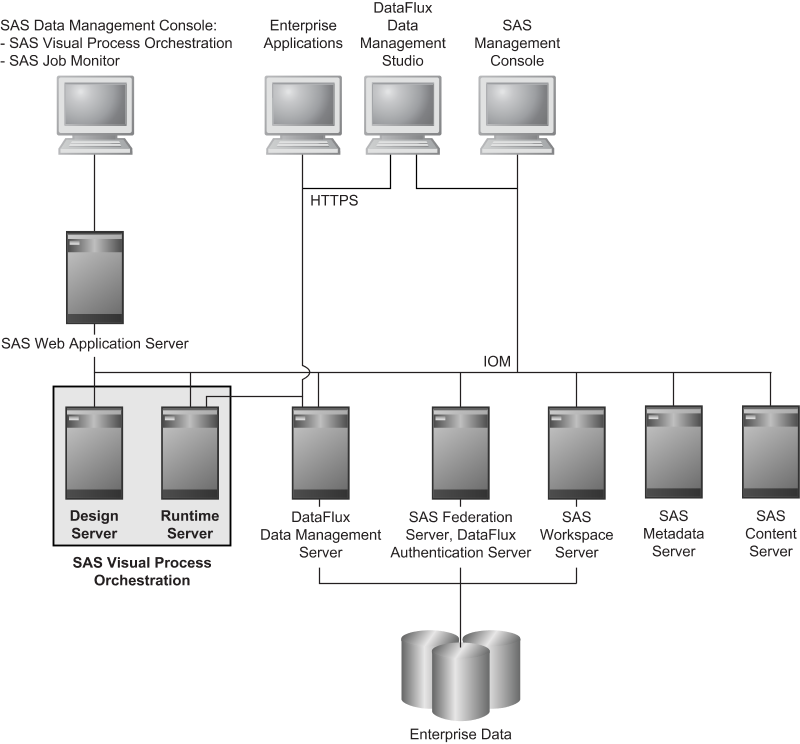
The clients and servers
in SAS Visual Process Orchestration are defined as follows:
SAS Data Management Console
This graphical client provides
access to the SAS Visual Process Orchestration Web Client and other
available clients such as the SAS Job Monitor.
SAS Visual Process Orchestration Web Client
This
web client provides a graphical user interface for the creation, modification,
and execution of orchestration jobs.
SAS Job Monitor
The SAS Job Monitor displays status
information for orchestration job runs. The SAS Job Monitor is provided
as part of the SAS Environment Manager. The SAS Job Monitor collects
information from specialized log files and processes that information
into displays and alerts.
SAS Web Application Server
This critical mid-tier
server performs a variety of services that enable authentication,
authorization, and data source locks on behalf of the SAS Visual Process
Orchestration Design Server, Runtime Server, and Web Client.
SAS Visual Process Orchestration Design Server
To create, modify,
or delete an orchestration job, the SAS web client sends a request
to the Design Server port. Listening at that port is a SAS Object
Spawner. The Object Spawner assigns an available instance of the Design
Server to the SAS web client. If the orchestration job already exists,
then the orchestration job is copied from the SAS Content Server.
The Design Servers are maintained in a pool. When the SAS web client
breaks its connection, the SAS Object Spawner returns the Design Server
to the pool for eventual reassignment to another SAS web client.
SAS Visual Process Orchestration Runtime Server
The Runtime Server
listens for SOAP requests from SAS web clients. When a client requests
the execution of an orchestration job, the job is copied from the
SAS Content Server. The Runtime Server then passes the job to an available
execution process, along with any input variables. The execution process
is part of a pool of available execution processes. When the job run
is complete, the execution process sends any output variables to the
Runtime Server, and the execution service returns to the pool. The
Runtime Server sends any output variables to the requesting SAS web
client.
SAS Metadata Server
The SAS Metadata Server maintains
the SAS Metadata Repository and communicates with SAS clients and
servers. The repository contains metadata definitions for all of the
users, groups, servers, jobs, and data objects that surround the process
of job orchestration. The SAS Metadata Server also works with the
SAS Web Application Server to authenticate and authorize users, in
coordination with network authentication providers.
SAS Content Server
The SAS Content Server stores all
orchestration jobs. The jobs are retrieved for execution on the host
of the Runtime Server.
DataFlux Data Management Server
The DataFlux Data
Management Server is one type of server that can execute the component
jobs and real-time services that are called during the execution of
orchestration jobs.
DataFlux Data Management Studio
This rich client
builds component jobs and real-time services, which are generally
stored and executed on DataFlux Data Management Servers.
Copyright © SAS Institute Inc. All rights reserved.