Change Log Events and Thresholds
Loggers and appenders determine the content in the log
files of the SAS Visual Process Orchestration Server logs. The loggers
and appenders are defined in log configuration files, such as
install-path/etc/dmserver.log.xml.
Appenders specify the
log output destination. Loggers specify log event types and thresholds.
If a logger lists a given log event, then those events are recorded
in the log file. The threshold value determines the amount of information
that is captured in the log file for each event. The available threshold
levels are ranked as shown in the following diagram.
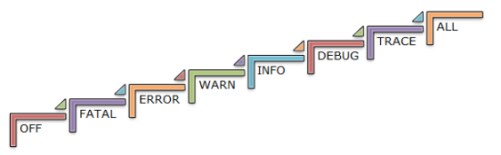
The default threshold
level capture most of the events that you will need to diagnose server
problems. However, should there be a need to increase logging events
and threshold levels, contact your SAS technical support representative
for assistance.
Copyright © SAS Institute Inc. All rights reserved.