Row-Level Security
Introduction
Row-level security (RLS)
for SAS Federation Server provides additional granularity
of security on tables and views. It allows only certain rows to be
selected for a given set of users and groups. Because row-level security
only applies to rows that can be selected, it is implemented as part
of the SELECT privilege. The SELECT privilege can be granted without
restriction, or with a predicate applied. When a predicate is applied,
this is called row-level security because the predicate will restrict
the rows returned.
For example, an administrator
might choose to grant SELECT privilege to USER1 on table T1. In this
case, USER1 is allowed to see all the data in the table. But an administrator
might allow USER1 to only select from rows where a column or set of
columns meet certain criteria, such as where the sales region is the
northeast. In this case, the grant statement looks like:
In this case, when members
of the group SALES select from table T1, the predicate is automatically
attached to the table when BOB, a member of the SALES, issues the
statement:
SELECT * FROM T1
Reference Administration
DDL for syntax
details about the GRANT statement.
Because the predicate
is automatically attached to the table, it must contain a valid WHERE
clause. The syntax can include sub-queries and references to other
tables. However, any external data referenced in the predicate must
be available on the user’s connection and the user must have
the SELECT privilege to access the data.
If the data is coming
from a different data source, then:
For example, a user
can select rows only from a table for which the user’s name
is listed in the “USER NAME” column of the table. To
apply this rule to all members of the SALES group, an administrator
can issue the following GRANT statement:
The RLS Library
and Library Reference contains details about callable functions for row-level
security.
Row-Level Security Privilege Assembly Rules
Overview
The SELECT privilege
for a user can be derived through group memberships. A user can be
a member of multiple groups, each granting SELECT privilege with attached
row-level security. One exception is the schema owner. Since a schema
owner effectively has all privileges granted, group membership is
not traversed for privileges at the schema level.
RLS predicates are assimilated
at each level in the securable hierarchy, starting with the table
or view object and progressing to the server object.
The procedure is repeated
over each object in the authorization hierarchy:
If an RLS predicate
is discovered at a specific level, it is combined with the other RLS
predicates at that level only, using an OR operator, and the process
stops. The procedure will produce predicates representing the summation
of RLS privileges closest to the user. This approach gives preference
to organizational security policies closer to the user over those
more distant. An unconditional GRANT or DENY at the same level as
an RLS predicate will be honored, and all RLS predicates will be ignored.
Example: RLS Predicate Union
In this example USER
is a direct member of the user-defined groups GROUP1, GROUP2 and GROUP4.
USER is also a member of the two built in groups, USERS and PUBLIC.
The RLS query returned for USER is (RLS1 OR RLS4 OR RLS3).
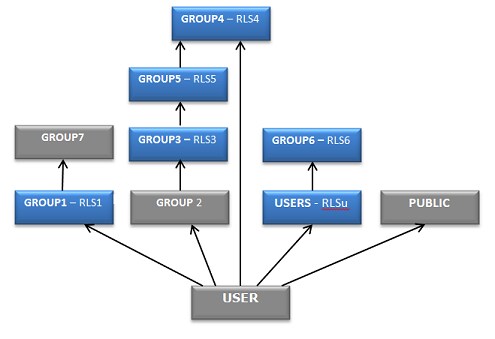
The first predicate,
RLS1, is encountered at level 1 in the graph, so the remaining RLS
predicates are captured at that level for the current graph, which
does not include the secondary graphs, USERS and PUBLIC. The GROUP1
node is marked as visited, and its parent (“member of”)
associations will not be navigated since it contributed a predicate.
After marking it as
visited the procedure skips GROUP2 since it has no assigned privileges
and proceeds to GROUP4 where the node is marked as visited and RLS4
is captured and combined to the query using an OR operator. There
are no more nodes at level 1, so the procedure continues with the
parent associations of GROUP2.
The RLS Library and Library Reference
RLS Library
Library Reference
Usage Notes for the
member_of and groups functions returning ‘ID’ or ‘DEEP’
member_of and groups functions:
-
options: a string literal containing 'GROUP', 'ID', or both (ex: 'GROUP, ID'). If multiple options are specified, they can be separated in the string by a blank ' ' or comma ','. If
optionscontains 'ID' the first argument is treated as an ID rather than a name. Ifoptionscontains ‘DEEP’ group membership will be checked recursively.
Copyright © SAS Institute Inc. All rights reserved.