Working with Resource Alerts
Overview of Alerts
If you want to identify a type of event for notification
or further action, you can create an alert. Alerts are a user-defined
type of event that indicates a critical condition in a selected resource.
When an alert occurs, it must be acknowledged, and alerts are listed
until they are marked as being fixed. You can define escalation schemes
to identify the actions that happen if an alert is not fixed within
a specified time.
Alerts are logged by
the agents and all events throughout the entire deployment are displayed
in the Alert Center. To access the Alert Center, select Analyze Event Center.
Event Center.

You can filter the alerts,
for example, so that only the most recent ones or the ones of a specified
type are displayed. Click the icon to acknowledge an alert. Select
the check box next to an alert, and then click Fixed to
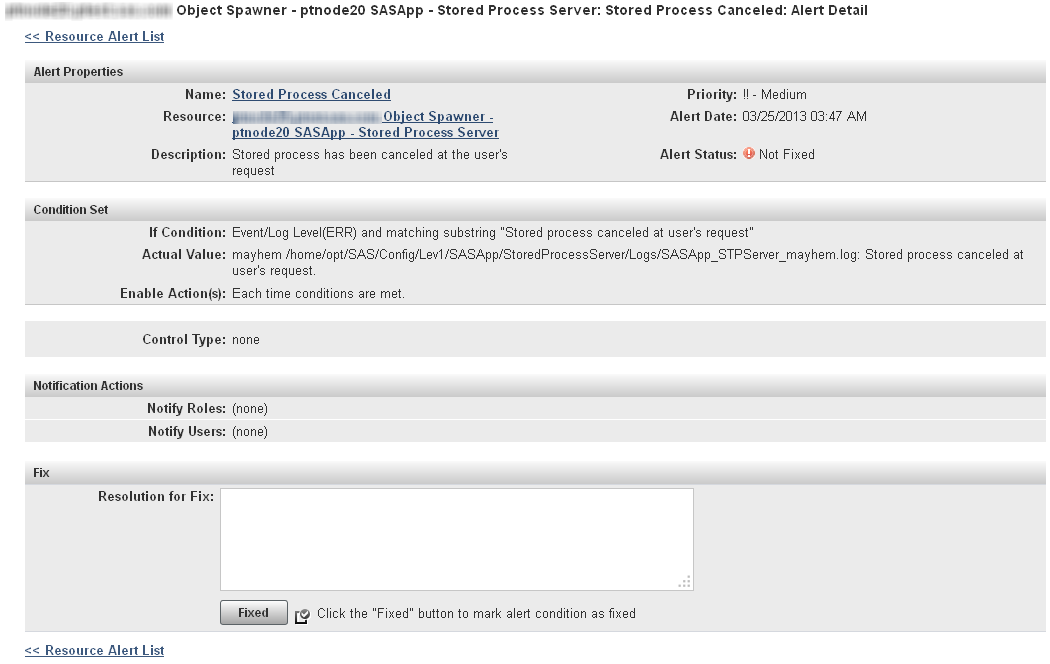
fix the alert. You can also click on the entry in the Alert
Definition column to display the Alert Details page,
where you can view details about the alert and mark the alert as fixed
(with comments).
Defining an Alert
-
In the Condition Set area, specify the conditions that must be met in order for the alert to be triggered. You can specify up to three conditions for each alert. Use these fields to specify the condition that triggers the alertMetricspecifies that the alert is triggered based on the value of a metric that is monitored for the resource. You can specify that the condition is based on comparison to a fixed value, a percentage of a value, or a change in value. If you want to create an alert for a metric that is not listed, you must first enable collection of that metric.Inventory Propertyspecifies that the alert is triggered based on a change in the value of a resource property (such as version number). This condition is available only for certain types of resources (such as platforms and SAS Metadata Servers).Control Actionspecifies that the alert is triggered when an action meets a specified condition (such as the action of stopping a failed server ). This condition is available only for servers that can be controlled through control actions. See Controlling Resources Using Control Actions for more information.Events/Logs Levelspecifies that the alert is triggered when a selected type of log entry (such as Error) and an optional accompanying text string appears in the log.If you are defining an alert based on events from SAS server logs, the available values in this field do not match the logging levels available in SAS server logs. The four SAS Environment Manager levels must match the six levels in SAS server logs. Selecting Error in this field matches both the Fatal and Error levels in SAS server logs. Selecting Debug in this field matches both the Trace and Debug levels in SAS server logs.
-
On the Alert Configuration page, you can specify an escalation scheme and identify the users and roles that should be notified when the alert occurs. To create an escalation scheme, see Defining an Escalation Scheme.


Defining an Escalation Scheme
An
escalation scheme is a series of actions that take place when an alert
is not acknowledged or fixed within a certain period of time. An escalation
scheme can be applied to multiple alerts. You can define an escalation
scheme to perform any of these actions:

Example: Defining an Alert for SAS Work Directory Space


Example: Defining an Alert for a SAS Server Log File
This example provides
information for setting up an alert to be triggered whenever a warning
message for the I/O Subsystem appears in the log of the SAS Metadata
Server. The alert should be issued every time an error appears in
the log.
-
Follow the procedure in Creating Events Based on SAS Server Logs to create an event from the SAS Metadata Server log file. Add the entry
level.warn.2=.*I/O Subsystem.*
to the sev_logtracker_plugin.properties file for the SAS Metadata Server. -
In the If Condition area, select the Event/Logs Level radio button, then select Warn in the Event/Logs Level field.


Copyright © SAS Institute Inc. All rights reserved.