Install and Configure SAS Enterprise Miner
Overview
For the best overall
explanation of the installation and configuration of the numerous
combinations of products and environments, see the SAS
9.4 Intelligence Platform Installation and Configuration Guide.
Use the SAS Deployment
Wizard to install and configure your software. For more information
about the wizard, see the SAS Deployment Wizard User’s
Guide, located at http://support.sas.com/documentation/installcenter/en/ikdeploywizug/66034/PDF/default/user.pdf.
In the following sections,
step-by-step examples of both server and workstation mode deployments
are provided to give you a better idea about what to expect when you
install SAS Enterprise Miner.
SAS Enterprise Miner Server Multiple Machine Deployment
Deployment Information
A server deployment
of SAS Enterprise Miner begins when you and your SAS representative
decide which software you need, determine which machines to install
the software on, and develop your installation plan. Each server deployment
requires a plan. In this example, one of the standard deployment plans
included in your SAS software is used to illustrate some of the options
available during a SAS Enterprise Miner server deployment.
The plan “EMiner,
TMiner, three machines” will install the server, mid-tier,
and client on three separate network machines. The plan uses the included
SAS Application Server on the mid-tier machine. For this example,
you need three separate machines on your network. You need to prepare
all three systems and complete the pre-installation tasks on each
machine.
Three Machine Setup, Stage 1 — Server
-
Log on to the computer that will be the SAS Enterprise Miner server machine. Start the SAS Deployment Wizard from the highest-level directory in your SAS Software Depot with the setup application that is appropriate to your operating system. For this example, on a 64–bit Windows system, double-click the
setup.exefile located in the SAS Software Depot folder. -
Select your preferred language for the SAS Deployment Wizard. Click OK.
-
The SAS Deployment Wizard opens.
-
Select Install SAS Software under End User Tasks. Click Next.
-
Specify SAS Home — Choose a file system location to use as the home folder for your SAS software. On Windows systems, the home folder location defaults to
C:\Program Files\SASHome. You can use the Browse button to navigate to an alternate location for theSASHomefolder. Click Next. -
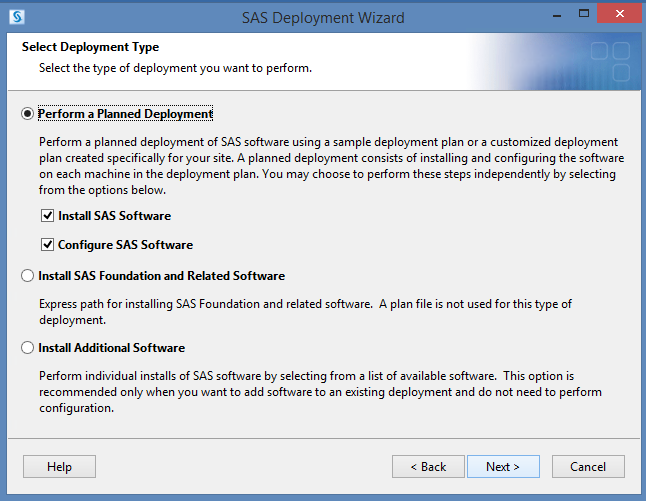
Select Deployment Type — The default installation selects Perform a Planned Deployment, Install SAS Software, and Configure SAS Software. Click Next.
-
Specify Deployment Plan — Choose Select a standard deployment plan and select EMiner, TMiner, three machines. If your SAS representative provided you with a custom plan file, select Specify the full path to a customized deployment plan. This is the
plan.xmlfile. Typically, the deployment plan is stored in theplan_filesfolder of the SAS Software Depot. If necessary, click Browse to navigate to yourplan.xmlfile. Click Next. -
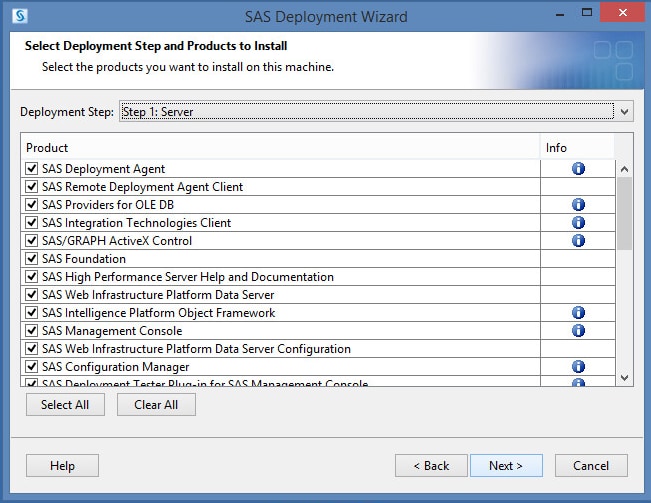
Select Deployment Step and Products to Install — Select Step 1: Server in the Deployment Step drop-down menu. Click Next.
-
Specify SAS Installation Data File — This is where you enter the path to your SID file. By default, the SID file is located in the SAS Software Depot, under the
sid_filesfolder. If necessary, click Browse to navigate to this file. Click Next. -
Select Language Support — Select the languages that you want to install for any products that are listed. Only those languages that are compatible with your locale are installed. Click Next.
-
Select Regional Settings — Use this window to determine the format and display of language-, region-, and locale-specific information. You can choose to configure SAS as a Unicode server, and force SAS to use UTF-8 encoding in all data sets, catalogs, and text that is written by SAS. This is useful if you need to share files with computers that use a different locale setting than your own. Click Next.
-
Specify SAS Clinical Standards Toolkit Libraries — Use the default values. Click Next.
-
Specify Environments URL — Specify a SAS Environments URL in the form of
http://localhost.localdomain:80/sas/sas-environment.xmlwhere localhost.localdomain is the current machine. -
SAS Document Conversion Host and Port — Use this window to specify the local host and port. The default value is 7111. Click Next.
-
Specify Remote Communication Configuration — Use the default value of 5660. Click Next.
-
At this point, the installer will check the machine in preparation of deployment. When it becomes available, click Next.
-
-
The following information is needed to configure your SAS software:
-
Select Configuration Prompting Level — Accept the default selection of Typical. Click Next.
-
Specify Configuration Information — This step creates your software’s configuration directory. The SAS Deployment Wizard can allocate up to 10 configuration levels, and the default directory is
C:\SAS\EMTM. The default Configuration Level isLev1. This configuration is saved inC:\SAS\EMTM\Lev1. Click Next. -
Local Machine Name — Specify the Fully Qualified Local Host Nameand the Short Local Host Name. Click Next.
-
Migration Information — You can use this step to migrate existing content. However, there is no existing content for this example. Click Next.
-
Integrated Windows Authentication — The default setting does not use Integrated Windows Authentication.
-
Token Based Authentication — This installation does not used token-based authentication. Click Next.
-
-
SAS server configuration: Accounts
-
SAS Metadata Server — Specify the Host Name and Port for your SAS Metadata Server. Click Next.
-
SAS Metadata Server: Override Backup Location — This window enables you to change the server backup location. Accept the default location. Click Next.
-
SAS Metadata Server: Override Service Login Account — The metadata server runs as a Windows service, and this page enables you to change the default credentials. Accept the default settings. Click Next.
-
Deployment Accounts: Types of Accounts — This window enables you to specify the types of accounts that are used. Accept the default selection. Click Next.
-
External Account: Installer — The default account will be your current user ID. Provide your password and click Next.
-
SAS Internal Account: Unrestricted Administrator — Specify a password for the internal SAS administrator account. Click Next.
-
SAS Internal Account: Trusted User — Specify a password for the internal SAS user sastrust. Click Next.
-
External Account: SAS Spawned Servers Account — Specify the credentials of a local account for the SAS Spawned Servers. This account must reside on the installation machine. Click Next.
-
Deployment Accounts: First User — Click Next.
-
Server Encryption — This window enables you to specify the encryption that is used by the server. Accept the default settings. Click Next.
-
Estimated System Size — Specify a size estimate for your SAS Enterprise Miner installation.
-
Specify Email Server — Use this window to configure the SMTP server that is used to send an email alert. Specify the Host Name and Port. Click Next.
-
Email Addresses — Specify a sender and recipient for email alerts. Click Next.
-
-
SAS Server Configuration: Services
-
SAS Object Spawner — Specify
8581for the Operator Port. Click Next. -
SAS Object Spawner: Port Bank — Accept the default values. Click Next.
-
SAS Application Server: Server Context — Accept the default value of
SASApp. Click Next. -
SAS Workspace Server — Specify
8591for the Port. Click Next. -
SAS Stored Process Server — Accept the default value for the Bridge Port. Click Next.
-
Store Process Server: Multibridge Connections — Accept the default values. Click Next.
-
SAS Web Infrastructure Platform Database Server — Enter the password for the database administrator. Click Next.
-
SAS DATA Step Batch Server — Accept the default values. Click Next.
-
Operating System Services Scheduling Server — Accept the default value of 8451. Click Next.
-
Scheduling Services Cache Locator — Accept the default value of 41415. Click Next.
-
Scheduling Services DIP Job Runner — Accept the default values. Click Next.
-
IP Multicast Version — Specify the appropriate IP Version for your installation.
-
IP Multicast — The multicast group communication includes all information that is needed to bootstrap SAS mid-tier applications. Because this includes sending the SAS environment credentials (such as the sasadm account name and its password), scoping and encryption options are provided. The default values are most appropriate for deployments in a firewall-isolated data center environment. The Deployment Wizard help documentation contains more information about these choices. Click Next.
-
SAS Environment Manager Agent — Specify your fully qualified domain name in the SAS Environment Manager Host Name field. Accept the default settings for HTTP Port and HTTPS Secure Port. Enter the SAS Environment Manager Agent password. Click Next.
-
SAS Internal Account: SAS Environment Manager Service Account — Specify the SAS Environment Manager Service Account Password for the SAS Environment Manager Service Account user name.
-
Deployment Summary — Review the software that you have selected before you start the installation process. If this information is correct, Click Start.
-
-
Deployment Complete — The SAS Deployment Wizard checks all stages for errors or warnings. Click Next.
-
Additional Resources — It is suggested that you record these links for future reference. Click Finish.
-
Configuration Guidelines and Details
-
The information found on this page is specific to your installation and is kept in your configuration directory. In this example, that would be
C:\SAS\EMTM\Lev1\Documents\Instructions.html.
-
-
Reboot — This is so that the user account’s Local Security Policy changes will take effect. This step is optional.
Three Machine Setup, Stage 2 — Mid-Tier
-
Log on to the computer that will be used as the SAS Enterprise Miner mid-tier machine. Start the SAS Deployment Wizard from the highest level directory in your SAS Software Depot with the setup application that is appropriate for your operating system. For example, on a Windows system, that file is setup.exe, and is located in the SAS Software Depot folder. Note that depending on any optional configuration of your software order, this might appear as Step 3.
-
Select your preferred language for the SAS Deployment Wizard. Click OK.
-
After the SAS Deployment Wizard opens, enter the following information in each screen.
-
Select Deployment Task — Select Install SAS software. Click Next.
-
Specify SAS Home — This is where you choose a file system location for the home folder for your SAS software. On a Windows system, this will default to
C:\Program Files\SASHome. You can use the Browse button to navigate to an alternate location for your SAS Home. Click Next. -
Select Deployment Type — Select Perform a Planned Deployment, Install SAS Software, Configure SAS Software. Click Next.
-
Specify Deployment Plan — For this example, select EMiner, TMiner, three machines. If your SAS representative provided you with a custom plan file, select Specify the full path to a customized deployment plan. You must specify the plan.xml file. Typically, the deployment plan is stored in the
plan_filesfolder of the SAS Software Depot. If necessary, click Browse to navigate to your plan.xml file. Click Next. -
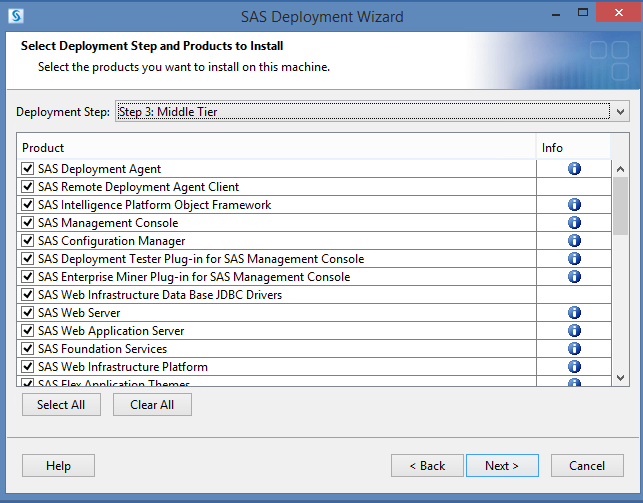
Select Deployment Step and Products to Install — The deployment plan determines the products to install and what order they are installed in. In the Deployment Step field, select Step 3: Middle Tier. Click Next.
-
Specify SAS Installation Data File — This is the path for your SID file. By default, the SID file is located in the SAS Software Depot under the sid_files folder. If necessary, click Browse to navigate to it. Click Next.
-
Select Region Settings — Specify how you want your SAS Software to format language, region, and locale-specific information. Also, you can configure SAS as a Unicode server, and force SAS to use the UTF-8 encoding in all data sets, catalogs, and text output. This can be useful if you need to share such files with computers that use different language representations. Click Next.
-
Specify Remote Communication Configuration — This window enables you to specify the port number and security configuration parameters for the SAS Deployment Agent. Accept the default values. Click Next.
-
Checking System — The SAS Deployment Wizard checks to ensure that the system has enough disk space and that the files and folders that it will write are accessible. Click Next.
-
-
The following information is needed to configure the software:
-
Review Required Software — This specifies the third-party software that will be required to continue the installation. SAS Enterprise Miner 14.2 requires Windows PowerShell 2.0. Click Next.Note: PowerShell is required only for Windows environments.
-
Specify Software Location — If Windows PowerShell 2.0 is already installed, this window will display the path to the installation directory. Click Next.
-
Select Configuration Prompting Level — Select Typical to display the basic set of configuration settings. To accept most defaults and for fewer options, select Express. For more granular configuration options, select Custom. To configure the SAS Enterprise Miner server, the Typical setting is recommended. Click Next.
-
Specify Configuration Information — This step creates your software configuration directory. The SAS Deployment Wizard can allocate up to ten configuration levels. The default settings create a level-1 configuration. For this example, the default configuration directory will be
C:\SAS\EMTM, and the configuration level will be Lev1. This configuration is saved inC:\SAS\EMTM\Lev1. If you create a level–2 configuration, the default location in Windows systems isC:\SAS\EMTM\Lev2. Click Next. -
Local Machine Name — By default, the Fully Qualified Local Host Name and the Short Local Host Name are given. Click Next.
-
Migration Information — Do one of the following:
-
If you are not upgrading from the previous release, then do not select Perform Migration. Click Next.
-
If you are upgrading from the previous, then do not continue with the remaining installation and configuration until you review the information in Chapter 4.
-
-
Integrated Windows Authentication — Detailed information about single sign-on is available in the SAS 9.4 Intelligence Platform Security Administration Guide. This example does not use Integrated Windows Authentication. By default, the box for Use Integrated Windows Authentication is not checked. Click Next.
-
-
Server Connection and Accounts
-
SAS Metadata Server — Enter the Host Name and Port used for the SAS Metadata Server in Stage 1 of these instructions. Click Next.
-
Deployment Accounts: Type of Accounts — SAS internal accounts are service entities that are used exclusively for SAS metadata administration. SAS internal accounts are intended to minimize the use of external accounts for SAS internal purposes. For this example, select Use SAS internal accounts when appropriate. Click Next.
-
SAS Internal Account: Unrestricted Administrator — This is the administrator for the SAS Metadata server. You must use the same password that was specified in the first step of these instructions. Click Next.
-
SAS Internal Account: Trusted User — This is a privileged metadata service account that is required to access metadata on behalf of users. You must use the same password that was specified in the first step of these instructions. Click Next.
-
Anonymous Web Access — Select the option Enable Anonymous Web Access (Optional). Click Next.
-
SAS Internal Account: Anonymous Web User — If you enable anonymous web access, this window enables you to specify the password for the internal SAS account that is stored in the metadata server. Click Next.
-
Email Server — Enter the host name and port number for the SMTP mail server that will send messages to the system administrator when the metadata server encounters a problem. The host name and port number should automatically be retrieved from the server that you configured in Stage 1. Click Next.
-
Email Address — The Sender Email Address is the address that is used to send email messages to the system administrator. The Recipient Email Address is the address that will receive the server warnings. If your email server requires logon credentials, enable the option Email Server Requires Authentication. The email server user ID and password are entered on a subsequent page if you select this option. However, this example does not enable this option. Click Next.
-
-
Mid-Tier Configuration
-
SAS Web Server: Automated or Manual Configuration Option — Accept the default option. Click Next.
-
SAS Web Server: Configuration — This window lists all current default web server configurations. Click Next.
-
Web Application Server: JMS Configuration — Accept the default values. Click Next.
-
Web Application Server: Cache Locator Configuration — Accept the default values. Click Next.
-
Web Application Server: Server Configuration — This is the logical name that will be used for your managed server. For this example, accept the default,
SASServer1. Click Next. -
Web Application Server: Server Ports — If you choose not to accept the default values, refer to your completed Pre-Installation Checklist for the values that you should enter. For this example, accept the default values. Click Next.
-
Web Application Server: Automatic Deployment — If you choose not to automatically deploy web applications, manual deployment instructions will be written to Instructions.html during the web application deployment stage. For this example, choose to have web applications automatically deployed to the web application server. Accept the default values. Click Next.
-
SAS Web Application Themes — Enter the fully qualified domain name to use when accessing themes. The default value is the name of the host where the configuration is performed. The port number provided here must be the same as the HTTP port of your managed server. If you choose not to accept the default values, refer to your completed Pre-Installation Checklist for the values that you should enter. The Configured Protocol is the communication protocol that is used when you access the installed themes. Accept the default value, which is HTTP Protocol. Click Next.
-
IP Multicast Version — Specify the appropriate IP Version for your installation.
-
SAS Content Server: Repository Directory — The SAS Content Server stores application objects, such as registered SAS Enterprise Miner Model Packages. Enter the location on your disk for the files of this repository. The SAS Content Server will work with a DBMS for persistence. For information about working with a DBMS, see “Administering the SAS Content Server” in SAS Intelligence Platform: Middle-Tier Administration Guide. Accept the default values. Click Next.
-
SAS Web Infrastructure Platform Database: JDBC Properties — Specify the user ID and password that are used to access the database that contains your SAS Web Infrastructure Database tables. If you have chosen automatic configuration of a database for the SAS Web Infrastructure Database, this user ID must have the ability to create tables and insert records. If you have not chosen automatic configuration, this user ID must have the ability to create tables, insert records, and delete records. Accept the default values. Click Next.
-
SAS Web Infrastructure Platform Database: JDBC Properties — This window enables you to specify the password for the shared services. Click Next.
-
SAS Environment Manager: Administration Database Configuration — This window enables you to specify the SAS Environment Manager Administration password. Click Next.
-
SAS Internal Account: SAS Environment Manager Service Account — This window enables you to specify the SAS Environment Manager Service Account password. Click Next.
-
SAS Environment Manager: Configuration — Accept the default values for HTTP Port and HTTPS Secure Port. Click Next.
-
SAS Environment Manager: Database Configuration — Enter the Database User, Database User Password, and Database Encryption Passphrase. Click Next.
-
SAS Environment Manager Agent Configuration — Accept the default values. Click Next.
-
SAS Environment Manager Enablement Kit Database Credentials — Specify the user name and password the SAS Environment manager Enablement Kit Database.
-
SAS Flex Application Themes — Specify the current fully qualified domain name. Click Next.
-
SAS Deployment Backup and Recovery Tool: Enable Central Vault — Accept the default selection. Click Next.
-
-
Deployment Summary — Review the software selections before starting the installation process. If everything is correct, click Start.
-
Deployment Complete — Check all stages for errors or warnings. Click Next.
-
Additional Resources — Record these links for future reference. These links will be needed in the post-installation process. Click Finish.
-
Configuration Guidelines and Details — This page of information is specific to your installation and is kept in your configuration directory. In this example, that would be
C:\SAS\EMTM\Lev1\Documents\Instructions.html.
Three Machine Setup, Stage 3 — Client
-
For the client installation, log on to the computer that will be used as the SAS Enterprise Miner client machine. Start the SAS Deployment Wizard from the highest-level directory in your SAS Software Depot using the setup application that is appropriate for your operating system. For example, on a Windows system, this is the file setup.exe, located in the SAS Software Depot folder. Note that depending on your software order, this might appear as Step 5.
-
Select your preferred language for the SAS Deployment Wizard. Click OK.
-
After the SAS Deployment Wizard opens, enter the following information:
-
Select Deployment Task — Select Install SAS Software. Click Next.
-
Specify SAS Home — Choose a file system location for the home folder for your SAS software. On Windows systems, this will default to
C:\Program Files\SASHome. You can use the Browse button to navigate to an alternate location for your SAS Home. Click Next. -
Select Deployment Type — Accept the default settings. Click Next.
-
Select Deployment Plan — Select EMiner, TMiner, three machines. If your SAS representative provided you with a custom plan file, select Specify the full path to a customized deployment plant. This is the plan.xml file. Typically, the deployment plan is stored in the plan_files folder of the SAS Software Depot. If necessary, click Browse to navigate to your plan.xml file. Click Next.
-
Select Deployment Step and Products to Install — The deployment plan determines which products to install and in what order. In the Deployment Step field, select Step 5: Clients. Click Next.
-
Select SAS Enterprise Miner Guide Mode — Select your operating system architecture. Click Next.
-
Select SAS Add-in for Microsoft Office Mode — Select your operating system architecture. Click Next.
-
Specify SAS Installation Data File — This is the path to your SID file. By default, the SID file is located in the SAS Software Depot under the sid_files folder. If necessary, click Browse to navigate to this file. Click Next.
-
Select Language Support — Select the languages that you want to install for the products that are listed. Only those languages that work with your locale are installed. Click Next.
-
Select Regional Settings — Specify how you want your SAS Software to format and display language, region, and locale-specific information. Also, you can configure SAS as a Unicode server and force SAS to use UTF-8 encoding in all data sets, catalogs, and text output. This can be useful if you need to share these files with computers that use different language representations. Click Next.
-
Select Microsoft Office Applications — Specify the Microsoft Office applications for which the SAS Add-In for Microsoft Office is installed.
-
SAS Environments URL — Enter the URL for the SAS Environment File that you chose in the Pre-Installation Tasks for SAS Enterprise Miner. This step lets you avoid manually creating and deploying a sas-environment.xml before using SAS Enterprise Miner. The default URL will resemble http://myserver.mynet.mycompany.com:80/sas/sas-environment.xml. For this example, the network machine name myserver.mynet.mycompany.com would be replaced with the name of the machine that contains the SAS middle tier, installed in Step 2 of these instructions. Click Next.
-
Checking System — The SAS Deployment Wizard checks to ensure that the system has enough disk space and that all files and folders that it needs to write are accessible. The installation cannot proceed until access is granted to any listed files. When the examination of your file system is complete and there are no files , click Next.
-
Select Configuration Prompting Level — Select Typical to display the basic set of configuration settings. To accept most defaults, and for fewer options, select Express. For more granular configuration options, select Custom. To configure the SAS Enterprise Miner server, the Typical setting is recommended. Click Next.
-
Specify Configuration Information — This step creates your software’s configuration directory. The SAS Deployment Wizard allocates up to ten configuration levels. The default settings create a level–1 configuration. For this example, the default configuration directory is
C:\SAS\EMTM, and the configuration level isLev1. This configuration is saved inC:\SAS\EMTM\Lev1. If you create a level–2 configuration, it will be saved inC:\SAS\EMTM\Lev2. Click Next. -
Local Machine Name — By default, the Fully Qualified Local Host Name and the Short Local Host Name are provided. Click Next.
-
Migration Information — Do one of the following:
-
If you are not upgrading from the previous release, then do not select Perform Migration. Click Next.
-
If you are upgrading from the previous release, do not continue with the remaining installation and configuration until you have reviewed the information indicated in Chapter 4.
-
-
Integrated Windows Authentication — (If prompted) Detailed information about single sign-on is available in the SAS 9.4 Intelligence Platform Security Administration Guide. In this example, do not select the check box for Use Integrated Windows Authentication. Click Next.
-
SAS Metadata Server — Enter the host name and port that is used for the SAS Metadata Server, as specified in Step 1 of these instructions. Click Next.
-
Deployment Summary — Review the software selections before starting the installation process. If everything is correct, Click Start.
-
Deployment Complete — Check all stages of the installation for errors or warnings. Click Next.
-
Additional Resources — Record these links for future reference. Click Finish.
-
-
Configuration Guidelines and Details
-
This page of information is specific to your installation and is kept in your configuration directory. In this example, that directory is
C:\SAS\EMTM\Lev1\Documents\Instructions.html.
-
Copyright © SAS Institute Inc. All Rights Reserved.