DataFlux Data Management Studio
Quality Nodes
Data jobs are the main way to process data in DataFlux
Data Management Studio, which is available as a part of the SAS Data
Quality bundle.
Overview
You can use the data
quality job nodes in the application and the Quality Knowledge Base
to analyze data that is specified in these data jobs.
Some of the key DataFlux
Data Management Studio data quality processes are addressed with the
following data job nodes:
DataFlux Data Management
Studio also contains data job nodes for Right Fielding, Create
Scheme, Dynamic Scheme Application, Field
Extraction, and Document Extraction.
Other data job and process job nodes support functions such as data
flow into and out of jobs, data integration, and data monitoring.
These nodes can be use to enhance jobs that include data quality nodes.
For more information about these nodes, see the DataFlux
Data Management Studio User’s Guide for your version
of the application. You can also review the Data Access, Data Integration,
and Data Governance sections of this overview.
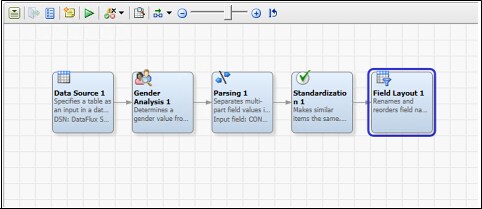
Many of these nodes
access information from an appropriate SAS Quality Knowledge Base
(QKB). A QKB is a set of files that contain rules, expressions, and
reference data that are combined to analyze and transform text data
in various SAS products. You can modify these QKBs to create custom
data quality logic for operations such as custom parsing or matching
rules.
Gender Analysis
These nodes are designed
to process data in ways that generate very specific pieces of information.
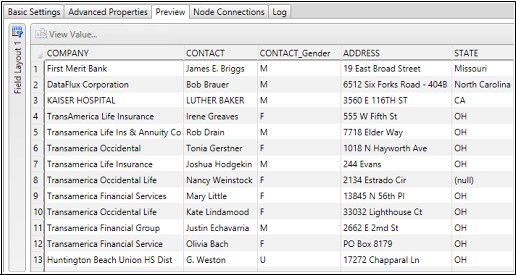
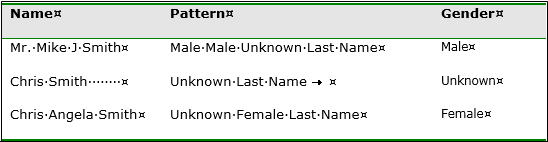
For example, the Gender Analysis node determines
a gender value from a list of names by using advanced word vocabularies
and associated gender rules. The node parses names into name prefix,
given name, middle name, and last name.
Identification Analysis
Identification analysis
is the process of accurately flagging the type of data found within
a field and bucketing the identified content into the appropriate
field. Contact-related information is often used across contact fields
such as name, address1, address2, and so on. You cannot assume that
only names are found in a field simply because the field is named
“CONTACT NAME”. This same example can be extended to
address information, which is often used across many different address
lines. SAS uses advanced word vocabularies and pattern libraries to
correctly identify the type of data found in each field. After identifying
the content, it moves the data to a new uniform field.
Parsing
SAS uses extensive pattern
libraries and categorized lookup tables to intelligently break multi-value
fields into parsed elements.
The SAS solution includes
the following pre-defined parsing definitions:
-
Address
-
City
-
City, State/Province, Post Code
-
Email
-
Phone
-
Website URLs
-
Date
-
Name
-
Two names
-
Account number
-
Date time stamps
-
Company names
-
Phone numbers
-
State/Province
-
Post codes
For a given data type,
the SAS engine uses customized pattern libraries that are tuned for
the specific type of content being processed. These definitions include
pattern rules, word vocabularies, automatic categorization, and other
advanced processes that allow the engine to intelligently break data
into pre-defined groups. After categorizing and identifying every
word in a field, the engine uses a proprietary, patent-pending natural
language processing engine to identify the best pattern match based
on heuristic rules.
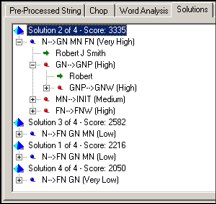
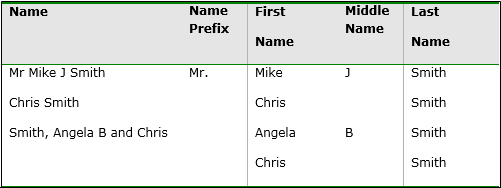
In this case, the parsing
engine identifies four potential solutions for breaking the name into
first name, middle name, and last name. These solutions are (indicated
by the “x of 4”
text next to the score. The engine then selects the parse solution
with the highest score and outputs the name tokens according to the
defined pattern.
The example illustrates
the complex logic applied during the parsing process. The first pattern,
solution 2, matches the name to a known pattern [Given Name] [Middle
Name] [Last Name]. Solution 3 matches the name to a different pattern
[Family Name] [Given Name] [Middle Name]. In this case, the solution
is given a lower score by the engine because the pattern has a lower
priority than the previous pattern. Solution 1 and solution 4 are
also scored as low-priority patterns. Therefore, the natural language
engine decides that solution 2 is the best way to break apart the
data (the “best solution”). Word categorization and
pattern scores are completely user-tunable. If the selected pattern
is not the best pattern, you can simply increase the pattern likelihood
in order to modify the output.
Standardization
SAS supports advanced
standardization routines that include element standardization, phrase
standardization, and pattern standardization. Each standardization
approach supports the ability to eliminate semantic differences found
in source data. These differences include multiple spellings of the
same information, multiple patterns of the same data, or the translation
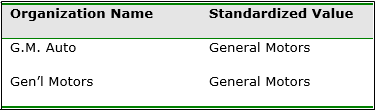
of inventory codes to product descriptions. For example, phrase standardization
describes the process for modifying original source data from some
value to a common value.
Change Case
SAS change case functionality
includes standard uppercase, lowercase, and proper case of words,
as well as intelligent casing. In addition to normal proper casing
rules, intelligent casing includes the ability to recognize casing
exceptions such as eBay, SAS, and others. Intelligent casing definitions
exist for the following types of data:
-
addresses
-
city, state, or province
-
name
-
company name
-
business title
-
text
Locale Guessing
The Locale
Guessing node compares with your data to guess the country
(locale) to which your data applies. Locale identification supports
the ability to automatically identify the locale associated with a
name, address, and other types of information in order to optimize
the matching, parsing, and standardization process. Name, address,
and other types of data vary greatly based on the associated locale
or country. Locale guessing ensures that the best country rules are
used.
Data Enrichment
You can also use the nodes in the data jobs enrichment
category to enrich, standardize, and augment the data that is specified
in a data job.
Address Verification
The US address verification
engine in DataFlux Data Management Studio has been certified by the
United States Postal Service (USPS) and conforms to all of the CASS
certification rules.
US address verification
performs the following corrections in order to standardize and enrich
the quality of any US address:
-
spelling correction (street names and street elements)
-
street type and directional append
-
format standardization according to USPS rules
Additional address
verification functions include the following:
Delivery Point Validation (DPV)
Delivery Point Validation
validates the actual existence of a location that can receive mail.
Although an address might be CASS certifiable, the actual physical
address might not even exist. This can occur because the USPS reserves
the address for a future building (apartment building, office building,
or consumer residence).
Locatable Address Conversion Service (LACS)
Locatable Address Conversion
Service (LACS) is a product that allows mailers to identify and covert
a rural route address to a “city-style” address.
Residential Delivery Indicator (RDI)
The Residential Delivery
Indicator engine can be used in conjunction with RDI data provided
by the USPS. This indicator validates the type of address as a residential
address or a non-residential address. RDI data is not distributed
by SAS, but is available from the USPS for a modest annual fee. The
RDI engine returns an RDI result code.
eLOT™
eLOT™ gives
mailers the ability to sort their mailings in approximate carrier-casing
sequence. eLOT™ processing can be used by mailers to qualify
for enhanced carrier route presort discounts.
An address verification
node is also available for Canada, and two nodes cover the rest of
the world.
Address Update
DataFlux Data Management
Studio also contains Address Update nodes
in the job and process node Enrichment category.
You can use these Address Update nodes to
apply the functions included in the National Change of Address (NCOA)
service to your data. This service makes address update information
available to mailers, which helps reduce undeliverable mail.
US city, state, and
ZIP code lookup enables lookup of either the city and state by the
ZIP code or the ZIP code by city and state. If you look up the city
and state by the ZIP code, you can return more than one city name
for the supplied ZIP code. You can configure the number of possibilities
that are returned.
Geocoding
SAS offers a Geocode node
to support geocoding for any address within the US and Canada. Geocoding
support includes the ability to identify the longitude and latitude
of a specific address. It also enables the identification of census
code information.
Address verification
and geocoding support is available for most countries in the world.
However, no census information is associated with this support.
For a given address,
the geocoding engine returns the following:
-
latitude
-
longitude
-
state/county/tract/block
There are two options
available for geocoding: centroid of the postal code or rooftop-level
geocoding.
County Processing
The SAS solution supports
the ability to identify US county information from a Federal Information
Processing Standard (FIPS) code. County enrichment is licensed along
with the geocoding engine, and the reference file is updated quarterly.
The FIPS code can be
generated by the geocode or phone analysis and can be used to identify
the following information:
-
US county name
-
county seat (government capital)
-
time zone offset from GMT (Greenwich Mean Time)
-
type of county
-
population
-
area in square miles
-
result
Phone Analysis and Enrichment
Phone analysis can be
used to identify discriminatory attributes associated with a phone
number, including items such as city, state, and MSA code. The phone
enrichment library is updated quarterly and supports area code updates,
splits, and much more.
Phone enrichment includes
the following information (for US and Canadian phone numbers):
-
country ISO name
-
state
-
city
-
FIPS code assigned by US Census Bureau
-
Metropolitan Statistical Area (MSA): closest major city
-
primary and largest MSA (closest, largest major city)
-
phone type (such as standard, cell, and beeper)
-
area code
-
overlay (additional valid area codes)
Area Code Processing
Area code enhancement
supports the ability to determine the valid area code associated with
a ZIP code. This enrichment, coupled with address validation works
to ensure that the contact information is always current. The area
codes reference library is updated quarterly along with the geocode
library.
Data Profiling
You can also use DataFlux
Data Management Studio to create and analyze data profiles. SAS data
profiling provides a more granular, table-level view of the data’s
strengths and weaknesses. It supports the ability to connect to virtually
any data source, including flat files, relational databases, and mainframe
systems. Through an intuitive user interface, analysts can simply
point the engine at a one or more sources and initiate the analysis.
SAS profiling extracts the data from the source system and performs
a three-phase profiling analysis composed of Data Discovery, Data
Completeness, and Relationship Analysis. Profiling then presents the
discovered statistics and potential anomalies to the analyst for rapid
data analysis.
When you profile your
data, you can perform the following tasks more efficiently:
-
identifying issues early in the data management process, when they are easier and less expensive to manage
-
obtaining more accurate project scopes and resource estimates
-
better understanding existing databases and evaluating how well they might support potential marketing activities
-
determining which steps you should take to address data problems
-
making better business decisions about your data
-
running periodic profiles to monitor your data and ensure that your data management processes are working well
Data profiling encompasses
discovery and audit activities that help you assess the composition,
organization, and quality of databases. Thus, a typical data profiling
process helps you recognize patterns, identify scarcity in the data,
and calculate frequency and basic statistics. Data profiling can also
aid in identifying redundant data across tables and cross-column dependencies.
All of these tasks are critical to optimal planning and monitoring.
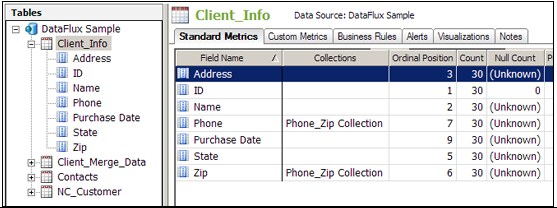
The data profiling engine
supports the following statistical analysis of source data:
Rule Validation
Apply advanced business
rules to ensure information quality. Rules can include the following
elements within rows, across rows, or across data sources: field comparison,
mathematical calculations, Boolean tests, and data analysis.
Sampling
Perform full data source
analysis or sample analysis based on a percentage of the data. The
user has the ability to specify the sample interval.
Redundant Data Analysis (join tests)
Identify redundant
information across tables or across data sources. SAS data profiling
supports both exact field redundant analysis and fuzzy matching analysis.
Fuzzy matching analysis applies domain-specific data quality match
rules to the field before testing for joins. For example, if you need
to identify potential overlap between two systems by company name,
the SAS profiling engine can identify the overlap between 5th
3rd Bank Copr. and The Fifth
Third Bank Corporation. Redundant data analysis
supports drill-down directly to the source record.
Key Relationship Analysis (primary and foreign key analysis)
Perform primary and
foreign key analysis that ensures 100% correspondence across primary
and foreign tables. You can also automatically identify orphaned records
within a database or across databases.
SQL Query Virtual Table Creation
Profile the results
of SQL queries and multiple table joins with full drill-down to the
source record. You can either enter your own SQL queries or use the
included SQL query builder.
Business Rules
Use profiling to take
advantage of the business rules that have been defined by enabling
users to apply them to a profile. This function enables you to identify
issues early in the process. When you view the profile report, the
violations are called out as alerts. These alerts identify areas that
should get your immediate attention.
Extended Reports Options (such as text file, HTML, by column,
and by metric)
Data profiling analysis
can be exported to HTML, Microsoft Excel, or text files. Organizations
can also write custom reports against the SAS profiling repository
because it is not a closed repository.
Batch Scheduling
You can use third-party
schedulers such as cron and Windows Scheduler to schedule profile
jobs. These jobs can be run at a specified interval, such as hourly,
daily, weekly, and monthly.
Open Repository
Statistics and information
derived during the profiling phase are not stored in a closed repository.
They can be stored in any ODBC-compliant database.
Data Trending
You can generate GUI-based
control charts that graph the change in profiling statistics and custom
metrics over time. Chart types include pie charts, line graphs, bar
charts, and more. You can automatically invoke events when data violating
user-defined rules is identified. These events include items such
as a log exception record, an email user, write data to database table,
and a log record to a text file. Time series profile metric collection
enables you to view profiling statistics from any point in time during
the monitoring lifecycle.
Metric calculations
SAS data profiling
capabilities display standard statistical calculations, including
those listed in the following list:
-
Data Type
-
Count
-
Unique Count
-
Null Count
-
Non-Null Count
-
Blank Count
-
Pattern Count
-
Minimum Value
-
Maximum Value
-
Maximum Length
-
Mean
-
Median
-
Standard Error
-
Mode
-
Standard Deviation
-
Custom Metrics (which create company-specific profiling statistics)
-
Data Length
-
Ordinal Position
-
Primary Key Candidate
-
Nullable
-
Decimal Places
-
Actual Type
-
Uniqueness
-
Minimum Length
-
Outliers
-
Percent Null
-
Percentiles
-
Pattern Distribution (which consists of a list of values with drill-down capability, filtering, and graphics
-
Frequency Distribution (which consists of a list of values with drill-down capability, filtering, and graphs)
Data Exploration
You can use data explorations
to identify data redundancies and extract and organize metadata from
multiple sources. Relationships between metadata can be identified
and cataloged into types of data by specified business data types
and processes. A data exploration reads data from databases and categorizes
the fields in the selected tables into categories. These categories
have been predefined in the QKB. Data explorations perform this categorization
by matching column names. You also have the option of sampling the
data in the table to determine whether the data is one of the specific
types of categories in the QKB.
For example, your customer
metadata might be grouped into one catalog and your address metadata
might be grouped in another catalog. Once you have organized your
metadata into manageable chunks, you can identify relationships between
the metadata by table-level profiling. Analyzing this data, relationships
between tables can be identified and cataloged to help users identify
areas that need further investigation. Data Exploration is a tool
that helps you understand your data and your data problems. Creating
a data exploration enables you to analyze tables within databases
to locate potential matches and plan for the profiles that you need
to run.
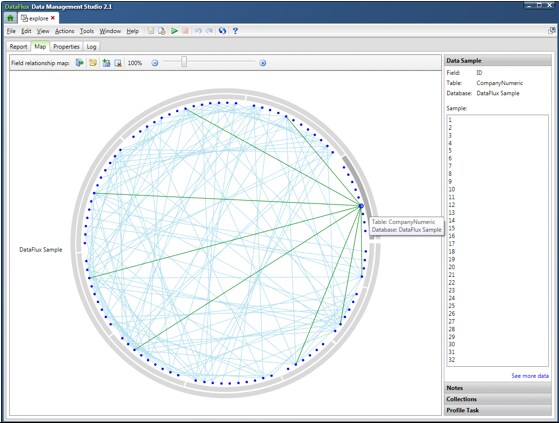
Each point contained
in the circle created by the outer database and the inner table rings
is a field in the data. Move the mouse over the point for a field
to see the name of the field and the names of the table and database
that contain it. You can also find the selected field in a report.
Once you have identified
possible matches, you can plan the best way to handle your data and
create a profile job for any database, table, or field. Thus, you
can use a data exploration of your metadata to decide on the most
efficient and profitable way to profile your physical data.
Data Matching and Entity Resolution
Entity resolution is
the process of merging multiple files (or duplicate records within
a single file). Once merged, the records referring to the same physical
object are treated as a single record. Records are matched based on
the information that they have in common. The records that you can
merge appear to be different but can actually refer to the same person
or thing. Entity resolution, record matching, and surviving records
are supported in DataFlux Data Management Studio. SAS Master Data Management is a more powerful
and specialized application that performs similar functions.
The SAS match engine
has been designed to enable both the identification of duplicate records
within a single data source. It also works across multiple sources.
The rules-based matching engine uses a combination of parsing rules,
standardization rules, phonetic matching, and token-based weighting
to strip the ambiguity out of source information. After applying hundreds
of thousands of rules to each and every field, the engine outputs
a match key. This match key
is an accurate representation of all versions of the same data generated
at any point in time. A sensitivity level
enables you to define the closeness of the match in order to support
both high-confidence and low-confidence match sets.
As well as offering
pre-defined match rules, SAS has designed an extremely customizable
match engine that allows your organization to define custom matching
rules. These match rules can include any number of fields, as well
as any number of match conditions coupled together using Boolean rules
(AND/OR). Matching records are then assigned a single group ID that
can be persisted and maintained over time. Duplicate records are grouped
based on linkage rules or automatically consolidated into a single best
record.
Note that the SAS engine
always generates the exact same match key for similar data generated
at any point in time across the enterprise. SAS is the only data quality
vendor that generates a single match key for an entity. These keys
can be generated in real time. They can also be persisted to a data
source to facilitate cross-system matching in batch or real-time environments.
The following display
illustrates how the SAS matching engine is able to strip ambiguity
from an address and generate a key for three distinct representations
of the same address:
Address Matching
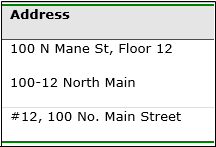
After eliminating pattern
differences, the match engine applies a series of string manipulations
to each token. Then, after applying hundreds of thousands of rules,
it outputs a 15-character match key. The match key can be used to
identify the address relationship across any number of disparate data
sources. When other fields such as business name and postal code are
combined in the match process, the records can be rationalized as
a single entity.
Following this stage,
the engine can be configured to perform one or all of the following
tasks:
-
displaying the matches in report format
-
automatically consolidating the records into one best record
-
appending grouping keys to each record and persist the keys over time
-
writing match keys to an index or a cross-references table
The SAS engine does
not require a change in the source or presentation data
to match the records. The SAS match algorithm applies data parsing,
standardization, and other algorithms during the match process. Some
data quality vendors require adherence to a strict methodology: parse
first, standardize second, and match third. The SAS engine applies
all of these processes during the actual match process.
The SAS engine supports
matching the types of information listed in the following list:
-
Address
-
City
-
City, State/Province, Post Code
-
Email
-
Phone
-
Website URLs
-
Date
-
Name
-
Two names
-
Account number
-
Date time stamps
-
Company names
-
Business titles
-
Phone numbers
-
State/Province
-
Postal codes
-
Countries
-
Text
Record consolidation,
or duplicate elimination, merges multiple records into a single best
record. The match engine supports user-defined record-level and field-level rules.
These rules enable you to use the engine to pick and choose information
from multiple records to compile a single version of the entity.
This record consolidation
includes both basic and advanced rules such as the following:
-
Field is not null or field is null
-
Field is not equal to X or is equal to X
-
Field has the highest occurring value within the duplicate record set
-
Field contains the highest value within the duplicate record set
-
Most or least recent create date
-
Source is equal to specified field or string
The SAS engine supports
persisted key clustering (or house holding). This type of clustering
enables the assignment of a single unique key to any record that conforms
to user-defined match rules. The engine uses sophisticated SAS match
keys to group records and assign an integer-based unique identifier.
If new records enter the system, the SAS clustering engine assigns
the existing integer ID to the new record and then logs the record
into the cluster table.
Sometimes, a new record
enters the system that causes two or more unique households to collapse
into one household. In that case, the SAS engine assigns the existing
cluster ID to the records. Then it logs the old household ID in the
grouping table. This engine supports the business need to track the
lifetime activity of any entity from supplier to end consumer and
can be run in both batch and real time.
For example, a record-level
rule might call for the preservation of a record with the most recent
edit or create date. However, this record might not include accurate
address information. If the address exists in another record, field-level
rules can be used to extract the address from the secondary record.
Then the address in the primary record can be replaced with this trusted
content.
Copyright © SAS Institute Inc. All rights reserved.