Steps
-
-
In the SAS Program Editor,
select
File Open Program
, and then select
CST_SDTM/programs/create_sourcemetadata.sas.
-
Select
RunSubmit.
This program outputs
to the SAS log and creates data sets in both the
results and
derived/metadata subdirectories
in the
CST_SDTM directory.
Note: For this program,
the library information was cleaned up, so these files are not immediately
accessible under
Libraries in the SAS Explorer.
On Microsoft Windows, you can access these files through the SAS Explorer
by navigating from within the SAS Explorer starting at the node labeled
My
Computer. On UNIX, it is necessary for you to copy these
data sets into a directory that is viewable by the SAS Explorer (for
example, your
Home Directory listed under
Favorite
Folders).
-
Review the log to see
whether there are any errors or warnings.
There should be no errors
or warnings.
-
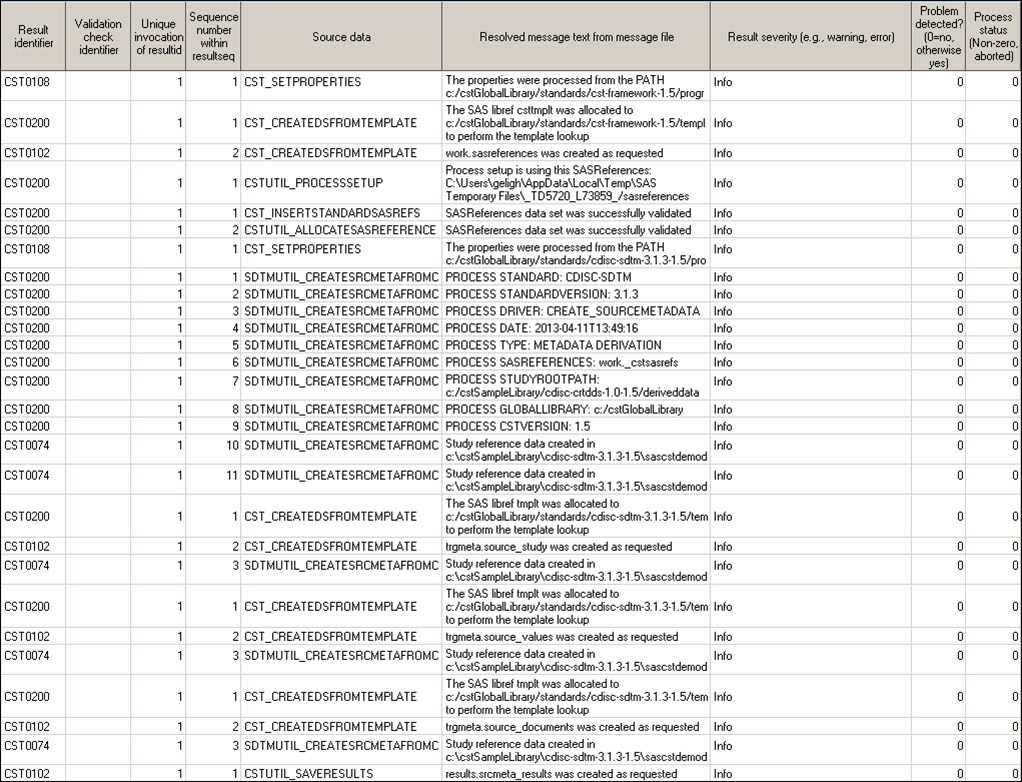
Review the srcmeta_results
data set in the
CST_SDTM/results directory
to ensure that the following conditions are met:
-
The
Resolved message
text from message file column (named message) contains
correct paths and process metadata.
-
Ensure that the column labeled
Process
status (named _cst_rc) is
0 for
all records.
-
Ensure that the data set contains
28 records.
See the sample output
above.
Note: Values that refer to temporary
directories, files, or
PROCESS DATE: vary.
-
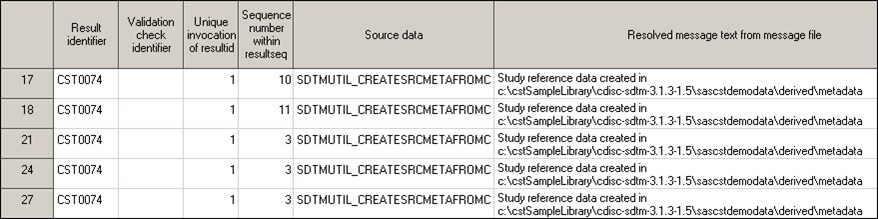
Where the
Result identifier equals
CST0074,
the records report that study reference data was created in folder
CST_SDTM/derived/metadata.
-
Review the
CST_SDTM/derived/metadata directory
to ensure that the following conditions are met:
-
There are five new data sets: source_columns,
source_study, source_documents, source_values, and source_tables.
-
The source_tables data set has
36 records and 15 columns.
-
Copyright © SAS Institute Inc. All rights reserved.