Steps
-
-
In the SAS Program Editor,
select
File Open Program
, and then select
CST_CRTDDS/Programs/create_sascrtdds_fromxml.sas.
-
Select
RunSubmit.
This program outputs
to the SAS log and creates the SAS representation of the CRT-DDS data
sets in the
CST_CRTDDS/deriveddata directory.
Tip
In the SAS Explorer, you can
also view it in the
srcdata library.
-
Review the log to see
whether there are any errors or warnings.
There should be no errors
or warnings.
-
Review the read_results
data set in the
CST_CRTDDS/results directory
to ensure that the following conditions are met:
Tip
In the SAS Explorer, you can
also view it as
read_results in the
Results library.
-
The column labeled
Process
status (named _cst_rc) is
0 for
all records.
-
The column named
resultflag is
0 for
all records.
-
The data set contains 50 records.
-
There is a record that contains
scrdata="CRTDDS_READ" that
reports that the define.xml file was read successfully.
-
There is a record that contains
srcdata="JAVA
                                             CHECK"
that reports
"No java
                                             issues"
.
-
Ensure that the
CST_CRTDDS/deriveddata directory
contains 39 SAS data sets that represent the SAS interpretation of
the CRT-DDS format.
-
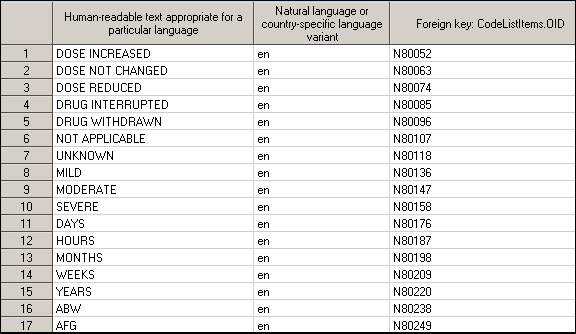
Open the clitemdecodetranslatedtext
SAS data set.
It must contain 2909
observations. The first 17 observations are shown in this figure.
-
Copyright © SAS Institute Inc. All rights reserved.