Attributes
Introduction
Attributes are the properties that specify the information associated with
a component, such as its name, description, and color. Each attribute includes metadata information such as Type, Value, and Scope. You can define and modify attributes
for a class with the Class Editor. You can define, modify, and create links between attributes
of an instance with the Properties window.
Attributes are divided into categories such as the “Appearance” category, which contains
attributes that control color and outline type. These categories make it easier to view and find related items.
For example, the Push Button Control has an attribute named
label that
specifies the text displayed on the button. You can create two instances
of the Push Button Control on your frame and have one display “OK”
and the other display “Cancel,” simply by specifying
a different value for the label attribute of each instance.
Attribute Metadata
SAS/AF software uses a set of attribute metadata to maintain and manipulate attributes.
This metadata exists as a list that is stored
with the class. You can query a class (or an attribute within a class) with specific
methods to
view attribute metadata. You can also create your own metadata list to add or change
an
attribute. For example, to list the metadata for the
label attribute,
execute code similar to the following:init:
DCL num rc;
DCL list metadata;
DCL object obj;
obj=loadclass('sashelp.classes.pushbutton_c.class');
rc=obj._getAttribute('label',metadata);
call putlist(metadata,'',3);
return;The following attribute metadata is returned:
(NAME='label'
 INITIALVALUE='Button'
 STATE='N'
 TYPE='Character'
 DESCRIPTION='Returns or sets the text displayed as the label'
 CATEGORY='Appearance'
 AUTOCREATE=''
 SCOPE='Public'
 EDITABLE='Yes'
 LINKABLE='Yes'
 SENDEVENT='Yes'
 TEXTCOMPLETION='No'
 HONORCASE='No'
 GETCAM=''
 SETCAM=''
 EDITOR=''
 VALIDVALUES=''
 CLASS=4317
)
The attribute metadata list contains the following named items:
Name
is the name of the attribute. Attribute names can be up to 256 characters long.
State
specifies whether the attribute is new (N), inherited (I) from another class, overridden
(O), or a system (S) attribute. System attributes are supplied by SAS/AF software. The only item in a system attribute's metadata list that you can modify
is its Initial Value.
Type
specifies the type of data being stored:
-
N = Numeric
-
C = Character
-
L = List
-
O = Object (generic)
-
Class Name = four-level name of a non-visual class (such as
sashelp.classes.colorlist_c.class) -
An array of a specific type and the boundary for each dimension of the array. For example,
Type
                                                = sashelp.classes.colorlist_c.class (1,2,3)
represents a three-dimensional array of type colorlist_c, with the upper boundaries for each dimension being 1, 2, and 3, respectively.
AutoCreate
specifies whether the attribute is automatically created and deleted by
SAS/AF software. This item applies only to attributes of type list (L) and specific objects
(O:classname). By default, the value is 'Yes,' which
indicates that SAS/AF will create the list or instantiate the object when the object that contains the attribute is instantiated. SAS/AF will also delete the list or terminate the object when the object that contains the
attribute is terminated. If the value is 'No,' then it is the responsibility of the
SCL developer to control the creation and deletion of the attribute.
InitialValue
(optional) specifies the initial value of the attribute; must be of the defined data
type.
Scope
specifies which class methods have permission to get or set the value of the attribute.
Valid values are Public | Protected | Private.
-
If Scope='Public', then any method of any class can get or set the attribute value. The attribute is displayed in the component's Properties window, and the attribute can be queried or set with dot notation in frame SCL.
-
If Scope='Protected', then only the class or its subclasses can get or set the attribute value in their methods. The attribute does not appear in the component's Properties window, nor can you access the attribute via frame SCL.
-
If Scope='Private', then only the class can get or set the attribute value in its methods. The attribute does not appear in the component's Properties window, nor can you access the attribute via frame SCL. Additionally, subclasses cannot access the attribute.
Editable
indicates whether an attribute can be modified or queried.
-
If Scope='Public' and Editable='Yes', then the attribute can be accessed (both queried and set) from any class method as well as from frame SCL program.
-
If Scope='Public' and Editable='No', then the attribute can only be queried from any class method or frame SCL program. However, only the class or subclasses of the class can modify the attribute value.
-
If Scope='Protected' and Editable='No', then the class and its subclasses can query the attribute value, but only the class itself can set or change the value. A frame SCL program cannot set or query the value.
-
If Scope='Private' and Editable='No', then the attribute value can be queried only from methods in the class on which it is defined, but it cannot be set by the class. Subclasses cannot access these attributes, nor can a frame SCL program. This combination of metadata settings creates a private, pre-initialized, read-only constant.
Note: If Editable='No',
the Custom Set Method is not called (even if it was defined for the
attribute). The default is 'Yes'.
Linkable
specifies whether an attribute can obtain its value from another attribute via attribute linking. Valid values are 'Yes' | 'No'. Only public attributes are linkable.
SendEvent
When SendEvent='Yes', SAS/AF software registers an event on the component. For example, the
textColor attribute has an associated event named “textColor Changed”. You can then register
an event handler to trap the event and conditionally execute code when the value of the attribute
changes.
If you change the SendEvent value from 'Yes' to 'No', and if Linkable='Yes', you must
send the “attributeName Changed” event programmatically with the attribute's setCAM in order for attributes that are linked to this attribute to receive notification
that the value has changed. If the linked attributes do not receive this event, attribute
linking will not work correctly. In the previous example, the setCAM for the
textColor attribute would use the _sendEvent method to send the “textColor changed” event.
ValidValues
specifies the set of valid values for a character attribute. Use blanks to separate
values, or, if the values themselves contain blanks, use
a comma as the separator. For example:
ValidValues='North South East West'
ValidValues='North America,South America,Western Europe'
If Type='C' and a list of valid values has been defined, the values are displayed
in a drop-down list for the attribute's Initial Value cell in the Class Editor and
for the attributes Value cell in the
Properties window.
ValidValues is also used as part of the validation process that occurs when the value
is set programmatically using dot notation or the _setAttributeValue method. For more
information on how the ValidValues list is used as part of the validation
process, see Validating the Values of Character Attributes.
You can also specify an SCL or SLIST entry to validate values by starting the ValidValues
metadata with a backslash (\) character, followed by the four-level name of the entry.
For
example:
ValidValues='\sashelp.classes.ItemsValues.scl';
Note: If you use an SLIST entry
for validation, all items in the SLIST must be character values. If
you use an SCL entry for validation, you must ensure that the SCL
entry returns only character items.
For more information on how to use an SCL entry to perform validation, see Validating the Values of Character Attributes.
Editor
specifies a FRAME, PROGRAM, or SCL entry that enables a user to enter a value (or
values) for the attribute. If supplied, the editor entry is launched by the Properties window
when a user clicks the ellipsis button (...) in the Value cell or
the Initial value cell in the Class Editor. The value that is returned
from the editor sets the value of the attribute. For more information,
see Assigning an Editor to an Attribute.
TextCompletion
specifies whether user-supplied values for the attribute are matched against items
in the ValidValues metadata for text completion. This item is valid only if the attribute
is Type='C' and a ValidValues
list exists. For example, if ValidValues='Yes No' and the user types 'Y', the value
'Y' becomes 'Yes' and appears in the input area.
HonorCase
specifies whether user-supplied values must match the case of items in the ValidValues
list in order to constitute a valid input value. This item is valid only if the attribute
is Type='C' and a ValidValues list is defined.
For example, if HonorCase='Yes',
ValidValues='Yes No', and the user types 'yes',
the value is not matched against the valid values.
However, if HonorCase='Yes',
ValidValues='Yes No', TextCompletion='Yes', and
the user enters 'Y', the value is found in the list of valid
values and is expanded to 'Yes'.
GetCAM
specifies the custom access method for retrieving the attribute's value (GETCAM). For information on how to assign a
CAM, see Assigning a Custom Access Method (CAM) to an Attribute.
SetCAM
specifies the custom access method for setting the attribute's value (SETCAM). For
information on how to assign a CAM, see Assigning a Custom Access Method (CAM) to an Attribute.
Category
(optional) specifies a logical grouping for the attribute. This item is used for category
subsetting in the Class Editor or for displaying
related attributes in the Properties window. For example, the Properties window
displays the following attribute categories for components that are
supplied by SAS:
|
Appearance
|
Misc
|
|
Behavior
|
Region
|
|
Data
|
Model/View
|
|
Drag and drop
|
Size/Location
|
|
Help
|
System
|
Not all categories appear for each class.
You can also create
your own category names simply by specifying a new category name in
the Class Editor. The category defaults to 'Misc' if one
is not supplied.
Automatic
is used only if an instance variable (IV) is linked to the attribute. (See the IV metadata item below.) This metadata
item exists to support legacy class information only. When an IV is linked to an attribute, the attribute's value persists
on the IV itself instead of on the attribute. If automatic is set to 'Yes,' then the
IV is an automatic instance variable as defined in SAS/AF legacy
classes.
IV
specifies the name of an instance variable on which the attribute value is stored.
This metadata item exists to support legacy class information only. Components that
are based on the SAS Component Object Model (SCOM) architecture do not use instance variables. It is recommended that you avoid using
instance variables.
Description
is a short description for the attribute. This item appears as help information in
the Class Editor and in the Properties window.
Attribute Values and Dot Notation
When you use dot notation in SCL to change or query
an attribute value, SAS/AF software translates the statement to a _setAttributeValue method call (to change
the value) or to a _getAttributeValue method call (to query the value).
These methods are inherited from the Object class and provide the basis for much of
the behavior of attributes.
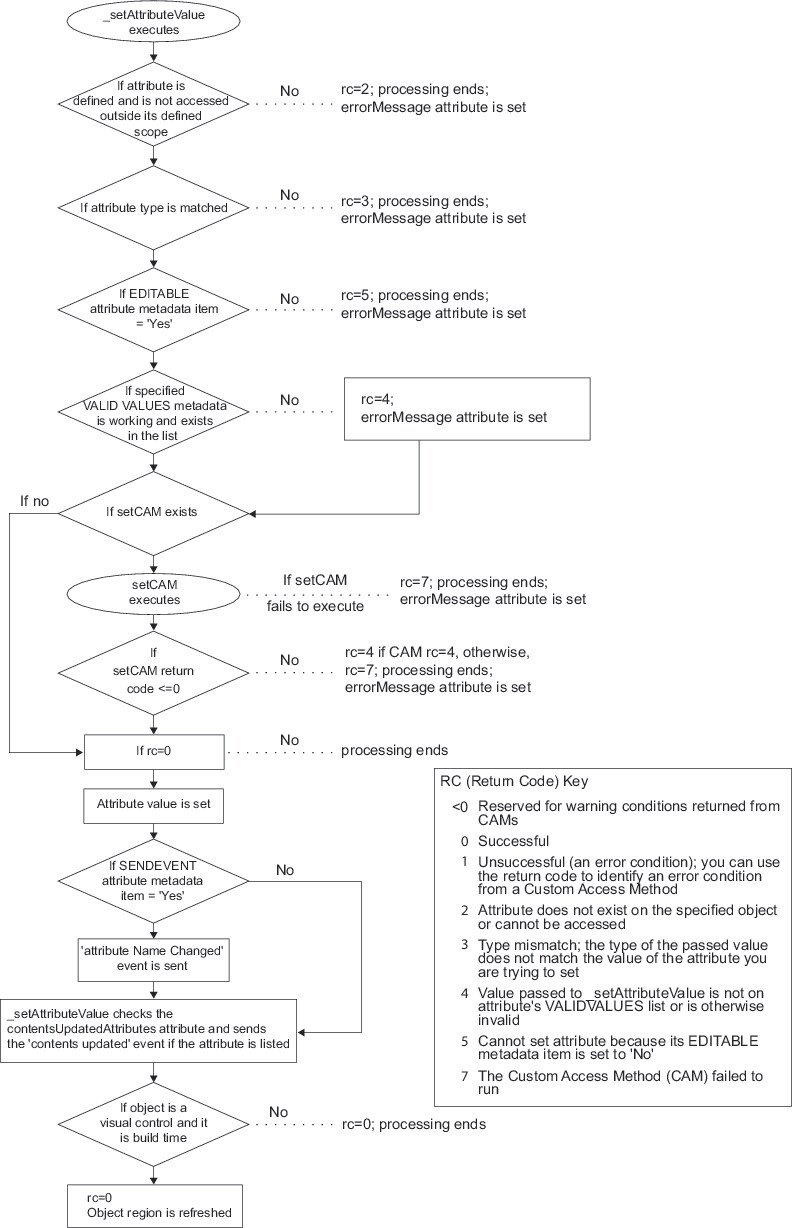
For example, the _setAttributeValue method
-
verifies that the attribute exists
-
verifies that the type of the attribute matches the type of the value that is being set
-
validates the value against the ValidValues metadata item if it exists for the attribute
-
invokes the custom set method (setCAM) if it exists
-
stores the value in the attribute
-
sends the “attributeName Changed” event if the attribute has a SendEvent='Yes' metadata item
-
sends the “contents updated” event if the attribute is specified in the object's
contentsUpdatedAttributesattribute to notify components in a model/view relationship that a key attribute has been changed
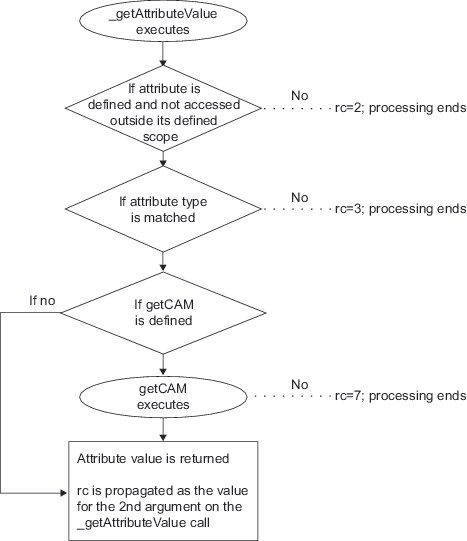
The following figures detail the flow of control for the _setAttributeValue
and _getAttributeValue methods.
Flow of Control for _setAttributeValue
Flow of Control for _getAttributeValue
Copyright © SAS Institute Inc. All Rights Reserved.
Last updated: May 27, 2017