Working with Frames
Opening an Existing FRAME Entry or Creating a New FRAME Entry
Frames provide the user interface to SAS/AF applications. Frames are stored in a SAS catalog entry of type FRAME. A frame is also an instantiation of the Frame class or one of its subclasses.
The SAS/AF application development environment provides
several ways to open an existing FRAME entry or to create a new one:
From the Explorer window
-
To open an existing frame, select a catalog, and then double-click on the FRAME entry you want to open.
-
To create a new frame, select the catalog in which you want to store the FRAME entry, and then select File
 New and
select Frame from the New Entry dialog box.
New and
select Frame from the New Entry dialog box.
From the Command prompt
To open an existing
frame or to create a new one, enter
build libref.catalog.framename.frame,
where framename is the name
of the FRAME entry.
From the SAS/AF software
development environment
To create a new frame
from the SAS/AF development
environment, select FileNew.
New.
From the Program Editor using PROC BUILD
To open an existing
frame or to create a new one, submit
proc build c=libref.catalog.framename.frame;
                                    run;
where framename is
the name of the FRAME entry.
The BUILD command has
advantages over the BUILD procedure in that the BUILD command enables
you to open more than one BUILD session at a time and allows you to
submit other SAS procedures while the BUILD session is active.
For detailed information
about working with frames, see the SAS/AF online Help.
Frame Types
You can create two types
of frames: standard or dialog. Standard frames define an application's
primary window or windows. Primary windows enable you to access secondary
windows that are needed to enter, edit, collect, or display information.
For example, a primary window of a word processor might include all
the menus or buttons used to access the commands or other windows
that are associated with the program.
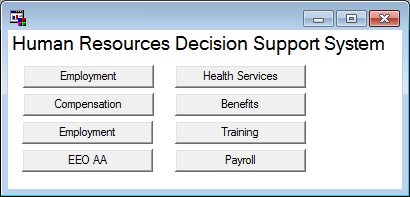
The following application
main menu is an example of a typical frame that was created using SAS/AF software.
Example of a Standard Frame
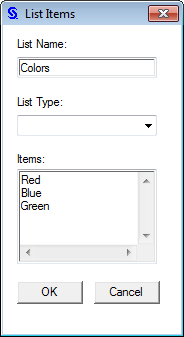
A dialog frame is used
to create secondary windows such as the dialog boxes, palette windows,
and message boxes that are accessed from a primary window. Secondary
windows are useful for specifying parameters or options, for displaying
error or information messages, and for providing a place to collect
user input. Dialog frames cannot be resized by users.
Example of a Dialog Frame
In your SCL programs, you can use the DIALOG function to open a frame as a modal window. For
more information, see Calling Dialog Boxes from an Application.
Note: All new frames are of type
standard by default.
To specify whether a frame should be of type standard or dialog, set the frame's
type attribute in the Properties window.
Frame Usage Tips
The following table
provides general information about working with frames. For more information,
see the SAS/AF online Help.
|
Task
|
Solution
|
|---|---|
|
Setting frame properties
|
Use the Properties window and select the _FRAME_ object.
|
|
Adding components to
a frame
|
Drag and drop components onto a frame from the Components window. Or, select a component in the Components window, and then double-click in the frame where you want to place
the component.
|
|
Positioning frame components
|
Use the mouse to drag
and position components. Use the Properties window to set component attributes that specify the component's position on a frame.
|
|
Adding a menu to a frame
|
Use the Properties window
to set the frame's
pmenuEntry attribute. You can create a new menu with the PMENU procedure.
|
|
Storing a frame
|
Save the frame to a
specific SAS catalog by selecting Save or Save
as from the File menu.
Frames are stored in
FRAME catalog entries.
|
Specifying the Frame SCL Entry
Frame SCL entries provide the SCL source code to control a frame. The name of the SCL entry that controls a FRAME entry is assigned through
the frame's
SCLEntry attribute. By default, the SCLEntry attribute
identifies the frame's SCL source as *.SCL, where the asterisk
(*) represents the name of the FRAME entry.
For more information about frame SCL, see Adding SAS Component Language Programs to Frames.
Compiling Frames
If your frame has an associated frame SCL entry, you must compile the frame in order
to associate the frame SCL with your frame.
To compile a frame (and its frame SCL entry), select BuildCompile from the Frame entry's Build window.
Compile from the Frame entry's Build window.
For more information
about compiling frames, see Compiling and Testing Applications.
Copyright © SAS Institute Inc. All Rights Reserved.
Last updated: May 27, 2017