
| Fractional Factorial Designs |
Defining Variables
Defining the variables for a fractional factorial design is the same as those for a full factorial design, which are described in the section "Creating a Full Factorial Design". Follow these steps:
- Select File
 Create New Design Two-level from the ADX desktop to open the main design window.
- Click Define Variables.
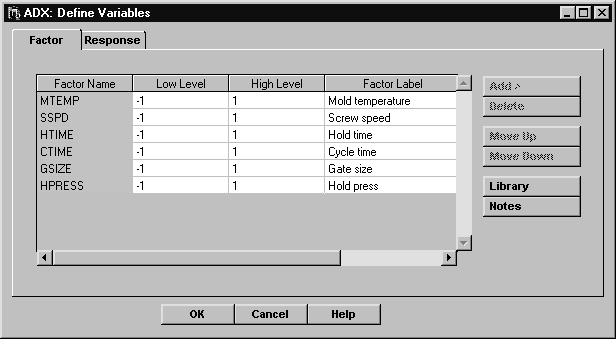
- The Define Variables window will appear. Click Add and select 6 as the number of rows to add. Recall that the low level is set to -1 and the high level is set to 1. Enter the factor names as shown in the illustration.
- Click the Response tab to enter response variables.
- Change the response name to SHRINK and the label to Observed Shrinkage.
- Click OK.
- ADX asks if you want to save the changes. Click Yes.
Copyright © 2008 by SAS Institute Inc., Cary, NC, USA. All rights reserved.